
Apr 20, 2026
How To Create a One-to-Many Relationship in an ER Diagram
How To Create a One-to-Many Relationship in an ER Diagram
How To Create a One-to-Many Relationship in an ER Diagram
Learn how to show a one-to-many relationship in an ER diagram, build a 1 to many relationship diagram, and place foreign keys using ChartDB.
Learn how to show a one-to-many relationship in an ER diagram, build a 1 to many relationship diagram, and place foreign keys using ChartDB.
Learn how to show a one-to-many relationship in an ER diagram, build a 1 to many relationship diagram, and place foreign keys using ChartDB.

Jonathan Fishner
9 minutes read
TLDR;
TLDR;
The rule: The "many" side always holds the foreign key, orders reference customers, not the other way around.
How to spot it: Say it out loud: "One ___ can have many ___." If it sounds natural, you have the direction.
How to draw it: In ChartDB, add the foreign key to the child table, connect it to the parent, and the cardinality renders automatically.
Common mistakes: Foreign key on the wrong table, modeling many-to-many as one-to-many, ignoring NULL constraints, and inconsistent column naming.
Why it matters: Most broken schemas trace back to a one-to-many relationship drawn in the wrong direction, catching it visually prevents production bugs.
The rule: The "many" side always holds the foreign key, orders reference customers, not the other way around.
How to spot it: Say it out loud: "One ___ can have many ___." If it sounds natural, you have the direction.
How to draw it: In ChartDB, add the foreign key to the child table, connect it to the parent, and the cardinality renders automatically.
Common mistakes: Foreign key on the wrong table, modeling many-to-many as one-to-many, ignoring NULL constraints, and inconsistent column naming.
Why it matters: Most broken schemas trace back to a one-to-many relationship drawn in the wrong direction, catching it visually prevents production bugs.
If you have worked with ER diagrams long enough, you have probably seen this happen.
The diagram looks fine at first glance. Tables are connected. Lines make sense. Everyone nods.
Then someone tries to use it.
A foreign key is on the wrong table.
A one-to-many quietly behaves like a many-to-many.
Two engineers argue for twenty minutes about which table is the “parent”.
The diagram was technically correct. Practically useless.
I am Jonathan, co-founder of ChartDB. One-to-many relationships are the most common thing you draw in database design, and somehow they are also the easiest to get wrong. I have seen production schemas break, migrations get rolled back, and weeks of work wasted because a simple relationship was drawn in the wrong direction.
In this guide, I will show you what a one-to-many relationship really means, how to quickly spot it, how to draw it correctly, and how to model it visually in ChartDB in just a few minutes.
What a One-to-Many Relationship Really Means
A one-to-many relationship answers a very simple question.
Can one row in table A be related to many rows in table B?
If the answer is yes, you are looking at one-to-many.
Some everyday examples make this clearer fast:
One user can have many orders.
One customer can have many invoices.
One team can have many members.
One blog post can have many comments.
The key detail people miss is this:
The “many” side always holds the foreign key.
Orders reference users.
Invoices reference customers.
Comments reference posts.
Not the other way around.
If you remember nothing else from this article, remember that.
How To Spot a One-to-Many Relationship Quickly
Here is a quick mental shortcut for identifying a one to many relationship in an ER diagram that works almost every time.
Ask yourself this sentence and read it out loud:
“One ___ can have many ___.”
If the sentence sounds natural, you have your direction.
For example:
One customer can have many orders.
One order can have many customers. That sounds wrong.
Once you know which side is “many”, you know where the foreign key belongs.
Here is the example of one to many relationship:
Customers
- id

Orders
- id
- customer_id
That is the whole rule.
Most mistakes happen when teams skip this step and jump straight into SQL.
How To Show One To Many Relationship In ER Diagram
This is where visual data modeling really pays off.
ChartDB makes defining 1 to many relationships in ER diagrams even easier as it is an open source database diagram editor. You can import your entire schema in this within 15 seconds with a single query.
When you add the foreign key it automatically renders the relationship line with the correct cardinality on each end.
Here is how you can do it step by step ⬇️
Step 1: Create the two tables
Start by creating your parent and child tables.
For example, customers and orders.
You can also start with a pre-built schema template if you are building a new schema from scratch.
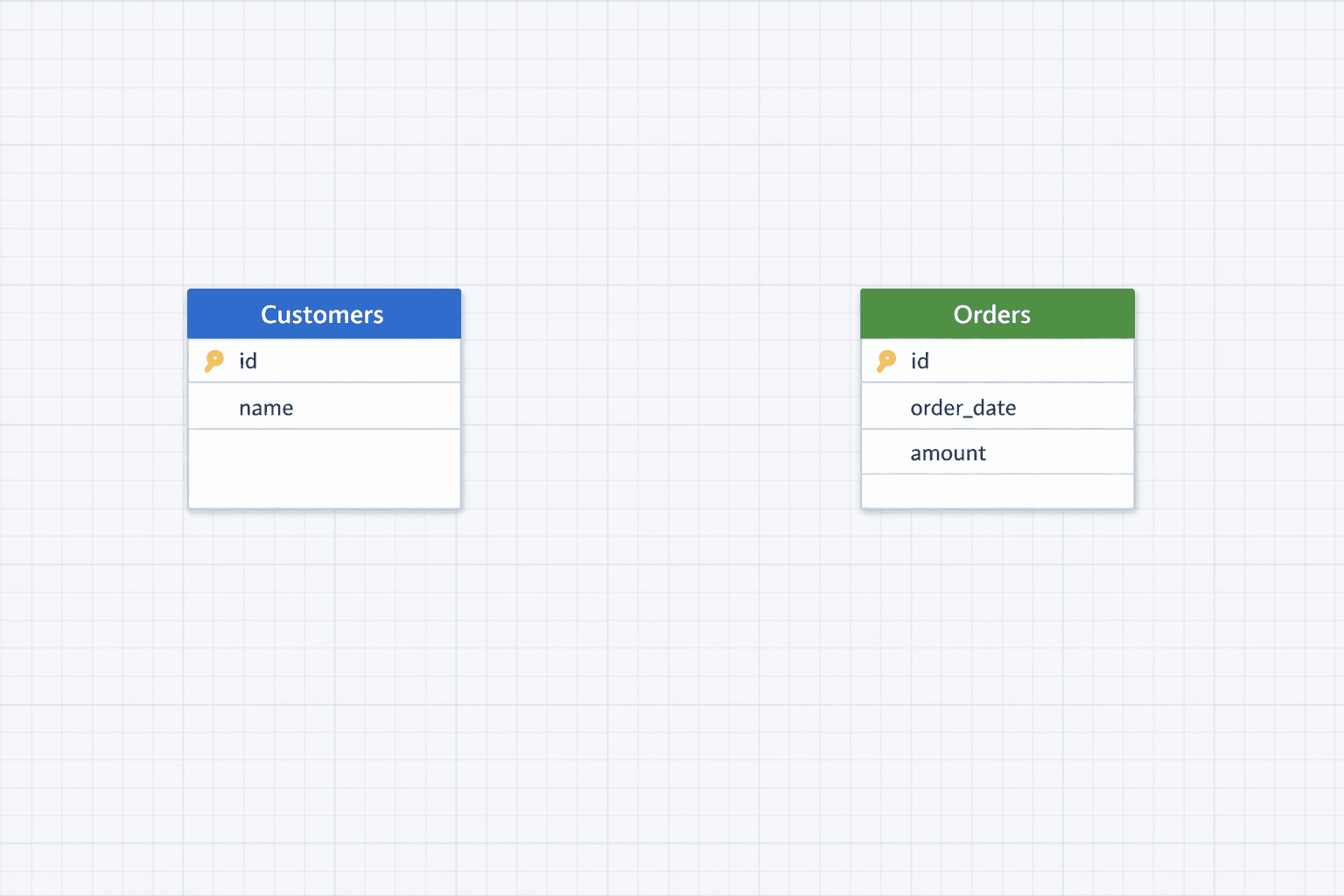
To make the schema easier to read, you can also color categorize tables.
Step 2: Decide which table is the parent
Say it out loud if needed.
One customer can have many orders.
That tells you customers is the parent, orders is the child.
Step 3: Add the foreign key to the “many” table
In ChartDB, add a customer_id column to the orders table and mark it as a foreign key referencing customers.id.
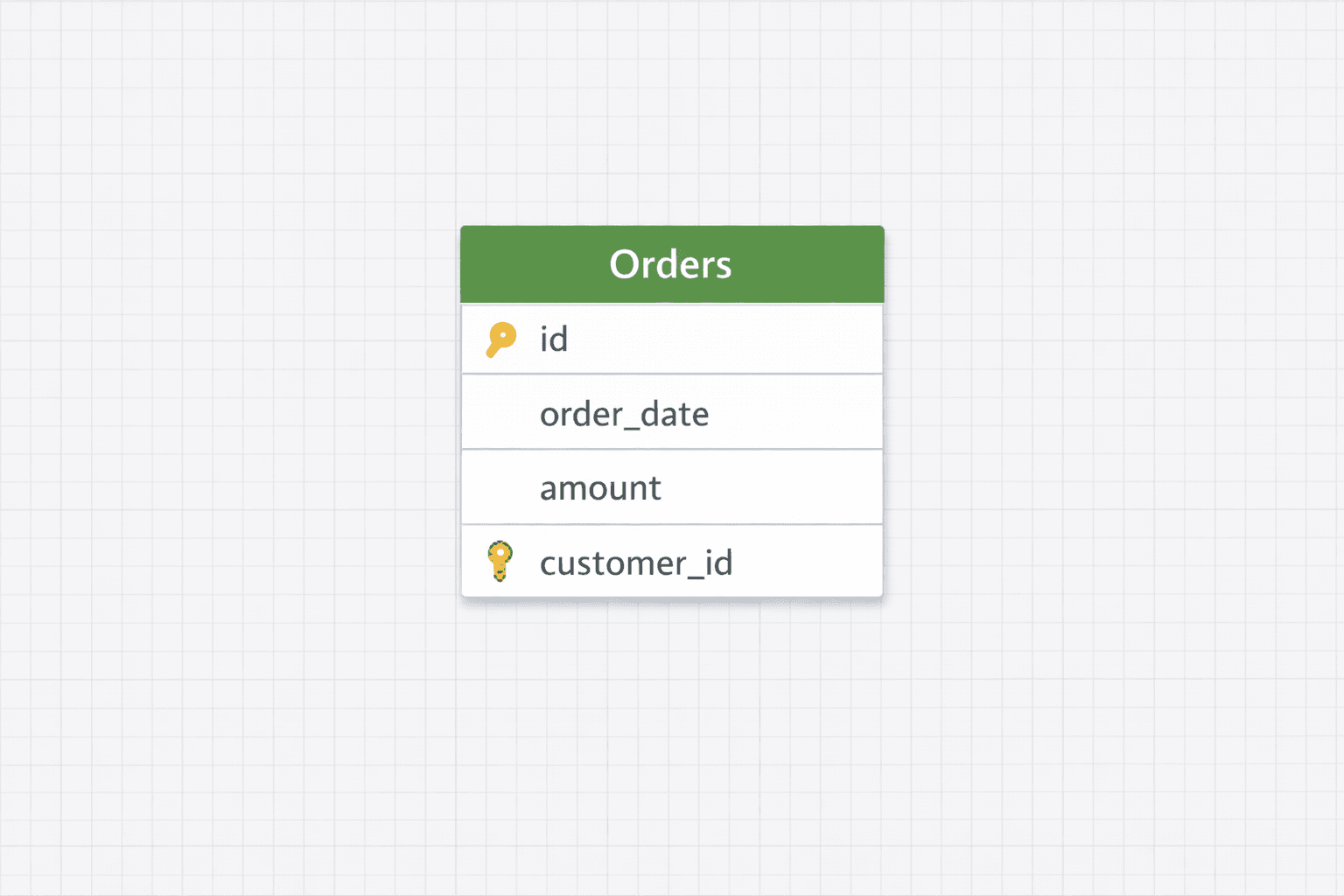
To know more about creating relationships with foreign keys, see the documentation.
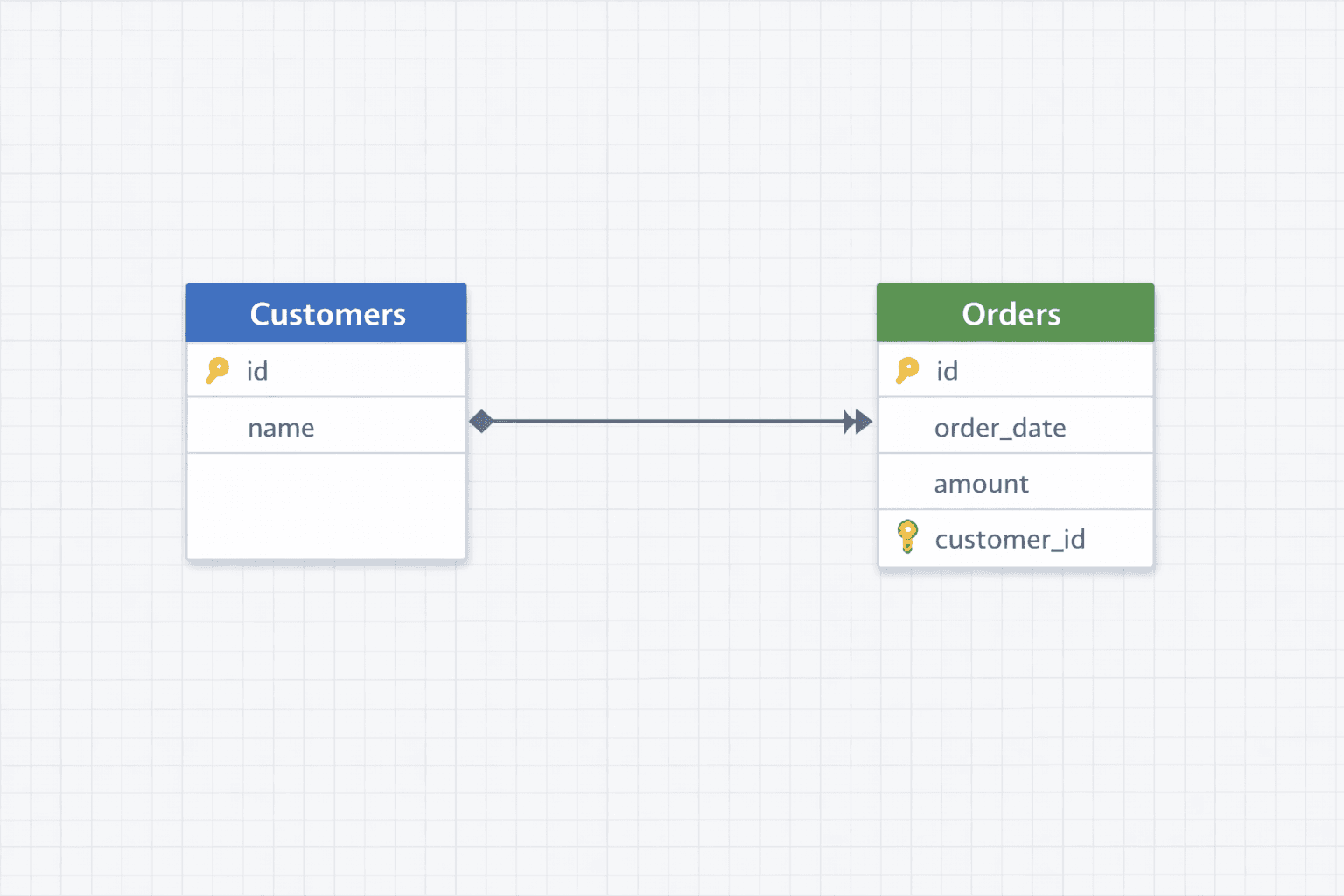
Step 4: Draw the relationship
Connect orders.customer_id to customers.id.
ChartDB will render this visually so the direction is obvious. One on the customer side, many on the orders side.
Step 5: Review and export
Once it looks right, you can export SQL or keep refining the diagram.
This whole flow takes minutes, not hours.
If you already have a schema written in SQL, you can also generate an ERD from SQL.
Common Mistakes (And How To Fix Them Fast)
These show up constantly. The fixes are simple once you know what to look for.
Mistake: Foreign key on the parent table
Why it hurts: You silently flip the relationship. Queries become confusing and constraints stop making sense.
Fix: Move the foreign key to the “many” table. Always.
Mistake: Modeling many-to-many as one-to-many
Why it hurts: You lose flexibility and end up duplicating data.
Fix: Introduce a join table. For example user_projects instead of forcing a single foreign key.
Mistake: Ignoring optionality (NULL vs NOT NULL)
Why it hurts: You allow orphaned rows or block valid use cases.
Fix: Decide explicitly. If every order must belong to a customer, make customer_id NOT NULL.
Mistake: Inconsistent naming (custId vs customer_id)
Why it hurts: It slows everyone down and causes subtle bugs in joins.
Fix: Pick one naming convention and enforce it everywhere.
Apart from these, I have also covered several other common database design mistakes in this blog. Feel free to check it out.
Frequently asked questions
How is ChartDB different from Microsoft Access for ER diagrams?
Microsoft Access has a basic relationship view but it only works with Access databases and the diagrams are not exportable or shareable in any meaningful way.
ChartDB is purpose-built for ER diagram visualization. it supports MySQL, PostgreSQL, SQL Server, and 7 other databases, auto-renders cardinality when you add a foreign key, and lets you export diagrams as SQL or images.
If your goal is specifically to visualize and document database relationships, ChartDB is the more capable tool for that job.
Does ChartDB work with my database?
ChartDB supports MySQL, PostgreSQL, SQL Server, SQLite, MariaDB, ClickHouse, CockroachDB, Oracle, Snowflake, and BigQuery. You can import your existing schema with a single query or build from scratch.
Can I export the ER diagram after drawing the relationship?
Yes. Once your one to many relationship diagram is ready, you can export it as a SQL DDL script to run against your database or as an image to use in documentation.
Conclusion
One-to-many relationships are simple once the direction is clear. Almost every issue comes from putting the foreign key on the wrong table or skipping the decision entirely.
Seeing relationships visually makes these mistakes obvious before they turn into production bugs.
Founder note, and this is personal. I have watched teams ship broken schemas because a one-to-many relationship was drawn the wrong way, and nobody noticed until data started flowing. That experience is a big reason why we built ChartDB. Relationships should be obvious, not hidden inside SQL files.
If you want to draw, verify, and export clean ERDs, try ChartDB for free. It is much easier to fix a diagram than to fix a database.
Relevant resources
If you have worked with ER diagrams long enough, you have probably seen this happen.
The diagram looks fine at first glance. Tables are connected. Lines make sense. Everyone nods.
Then someone tries to use it.
A foreign key is on the wrong table.
A one-to-many quietly behaves like a many-to-many.
Two engineers argue for twenty minutes about which table is the “parent”.
The diagram was technically correct. Practically useless.
I am Jonathan, co-founder of ChartDB. One-to-many relationships are the most common thing you draw in database design, and somehow they are also the easiest to get wrong. I have seen production schemas break, migrations get rolled back, and weeks of work wasted because a simple relationship was drawn in the wrong direction.
In this guide, I will show you what a one-to-many relationship really means, how to quickly spot it, how to draw it correctly, and how to model it visually in ChartDB in just a few minutes.
What a One-to-Many Relationship Really Means
A one-to-many relationship answers a very simple question.
Can one row in table A be related to many rows in table B?
If the answer is yes, you are looking at one-to-many.
Some everyday examples make this clearer fast:
One user can have many orders.
One customer can have many invoices.
One team can have many members.
One blog post can have many comments.
The key detail people miss is this:
The “many” side always holds the foreign key.
Orders reference users.
Invoices reference customers.
Comments reference posts.
Not the other way around.
If you remember nothing else from this article, remember that.
How To Spot a One-to-Many Relationship Quickly
Here is a quick mental shortcut for identifying a one to many relationship in an ER diagram that works almost every time.
Ask yourself this sentence and read it out loud:
“One ___ can have many ___.”
If the sentence sounds natural, you have your direction.
For example:
One customer can have many orders.
One order can have many customers. That sounds wrong.
Once you know which side is “many”, you know where the foreign key belongs.
Here is the example of one to many relationship:
Customers
- id

Orders
- id
- customer_id
That is the whole rule.
Most mistakes happen when teams skip this step and jump straight into SQL.
How To Show One To Many Relationship In ER Diagram
This is where visual data modeling really pays off.
ChartDB makes defining 1 to many relationships in ER diagrams even easier as it is an open source database diagram editor. You can import your entire schema in this within 15 seconds with a single query.
When you add the foreign key it automatically renders the relationship line with the correct cardinality on each end.
Here is how you can do it step by step ⬇️
Step 1: Create the two tables
Start by creating your parent and child tables.
For example, customers and orders.
You can also start with a pre-built schema template if you are building a new schema from scratch.
To make the schema easier to read, you can also color categorize tables.
Step 2: Decide which table is the parent
Say it out loud if needed.
One customer can have many orders.
That tells you customers is the parent, orders is the child.
Step 3: Add the foreign key to the “many” table
In ChartDB, add a customer_id column to the orders table and mark it as a foreign key referencing customers.id.
To know more about creating relationships with foreign keys, see the documentation.
Step 4: Draw the relationship
Connect orders.customer_id to customers.id.
ChartDB will render this visually so the direction is obvious. One on the customer side, many on the orders side.
Step 5: Review and export
Once it looks right, you can export SQL or keep refining the diagram.
This whole flow takes minutes, not hours.
If you already have a schema written in SQL, you can also generate an ERD from SQL.
Common Mistakes (And How To Fix Them Fast)
These show up constantly. The fixes are simple once you know what to look for.
Mistake: Foreign key on the parent table
Why it hurts: You silently flip the relationship. Queries become confusing and constraints stop making sense.
Fix: Move the foreign key to the “many” table. Always.
Mistake: Modeling many-to-many as one-to-many
Why it hurts: You lose flexibility and end up duplicating data.
Fix: Introduce a join table. For example user_projects instead of forcing a single foreign key.
Mistake: Ignoring optionality (NULL vs NOT NULL)
Why it hurts: You allow orphaned rows or block valid use cases.
Fix: Decide explicitly. If every order must belong to a customer, make customer_id NOT NULL.
Mistake: Inconsistent naming (custId vs customer_id)
Why it hurts: It slows everyone down and causes subtle bugs in joins.
Fix: Pick one naming convention and enforce it everywhere.
Apart from these, I have also covered several other common database design mistakes in this blog. Feel free to check it out.
Frequently asked questions
How is ChartDB different from Microsoft Access for ER diagrams?
Microsoft Access has a basic relationship view but it only works with Access databases and the diagrams are not exportable or shareable in any meaningful way.
ChartDB is purpose-built for ER diagram visualization. it supports MySQL, PostgreSQL, SQL Server, and 7 other databases, auto-renders cardinality when you add a foreign key, and lets you export diagrams as SQL or images.
If your goal is specifically to visualize and document database relationships, ChartDB is the more capable tool for that job.
Does ChartDB work with my database?
ChartDB supports MySQL, PostgreSQL, SQL Server, SQLite, MariaDB, ClickHouse, CockroachDB, Oracle, Snowflake, and BigQuery. You can import your existing schema with a single query or build from scratch.
Can I export the ER diagram after drawing the relationship?
Yes. Once your one to many relationship diagram is ready, you can export it as a SQL DDL script to run against your database or as an image to use in documentation.
Conclusion
One-to-many relationships are simple once the direction is clear. Almost every issue comes from putting the foreign key on the wrong table or skipping the decision entirely.
Seeing relationships visually makes these mistakes obvious before they turn into production bugs.
Founder note, and this is personal. I have watched teams ship broken schemas because a one-to-many relationship was drawn the wrong way, and nobody noticed until data started flowing. That experience is a big reason why we built ChartDB. Relationships should be obvious, not hidden inside SQL files.
If you want to draw, verify, and export clean ERDs, try ChartDB for free. It is much easier to fix a diagram than to fix a database.
Relevant resources
If you have worked with ER diagrams long enough, you have probably seen this happen.
The diagram looks fine at first glance. Tables are connected. Lines make sense. Everyone nods.
Then someone tries to use it.
A foreign key is on the wrong table.
A one-to-many quietly behaves like a many-to-many.
Two engineers argue for twenty minutes about which table is the “parent”.
The diagram was technically correct. Practically useless.
I am Jonathan, co-founder of ChartDB. One-to-many relationships are the most common thing you draw in database design, and somehow they are also the easiest to get wrong. I have seen production schemas break, migrations get rolled back, and weeks of work wasted because a simple relationship was drawn in the wrong direction.
In this guide, I will show you what a one-to-many relationship really means, how to quickly spot it, how to draw it correctly, and how to model it visually in ChartDB in just a few minutes.
What a One-to-Many Relationship Really Means
A one-to-many relationship answers a very simple question.
Can one row in table A be related to many rows in table B?
If the answer is yes, you are looking at one-to-many.
Some everyday examples make this clearer fast:
One user can have many orders.
One customer can have many invoices.
One team can have many members.
One blog post can have many comments.
The key detail people miss is this:
The “many” side always holds the foreign key.
Orders reference users.
Invoices reference customers.
Comments reference posts.
Not the other way around.
If you remember nothing else from this article, remember that.
How To Spot a One-to-Many Relationship Quickly
Here is a quick mental shortcut for identifying a one to many relationship in an ER diagram that works almost every time.
Ask yourself this sentence and read it out loud:
“One ___ can have many ___.”
If the sentence sounds natural, you have your direction.
For example:
One customer can have many orders.
One order can have many customers. That sounds wrong.
Once you know which side is “many”, you know where the foreign key belongs.
Here is the example of one to many relationship:
Customers
- id

Orders
- id
- customer_id
That is the whole rule.
Most mistakes happen when teams skip this step and jump straight into SQL.
How To Show One To Many Relationship In ER Diagram
This is where visual data modeling really pays off.
ChartDB makes defining 1 to many relationships in ER diagrams even easier as it is an open source database diagram editor. You can import your entire schema in this within 15 seconds with a single query.
When you add the foreign key it automatically renders the relationship line with the correct cardinality on each end.
Here is how you can do it step by step ⬇️
Step 1: Create the two tables
Start by creating your parent and child tables.
For example, customers and orders.
You can also start with a pre-built schema template if you are building a new schema from scratch.
To make the schema easier to read, you can also color categorize tables.
Step 2: Decide which table is the parent
Say it out loud if needed.
One customer can have many orders.
That tells you customers is the parent, orders is the child.
Step 3: Add the foreign key to the “many” table
In ChartDB, add a customer_id column to the orders table and mark it as a foreign key referencing customers.id.
To know more about creating relationships with foreign keys, see the documentation.
Step 4: Draw the relationship
Connect orders.customer_id to customers.id.
ChartDB will render this visually so the direction is obvious. One on the customer side, many on the orders side.
Step 5: Review and export
Once it looks right, you can export SQL or keep refining the diagram.
This whole flow takes minutes, not hours.
If you already have a schema written in SQL, you can also generate an ERD from SQL.
Common Mistakes (And How To Fix Them Fast)
These show up constantly. The fixes are simple once you know what to look for.
Mistake: Foreign key on the parent table
Why it hurts: You silently flip the relationship. Queries become confusing and constraints stop making sense.
Fix: Move the foreign key to the “many” table. Always.
Mistake: Modeling many-to-many as one-to-many
Why it hurts: You lose flexibility and end up duplicating data.
Fix: Introduce a join table. For example user_projects instead of forcing a single foreign key.
Mistake: Ignoring optionality (NULL vs NOT NULL)
Why it hurts: You allow orphaned rows or block valid use cases.
Fix: Decide explicitly. If every order must belong to a customer, make customer_id NOT NULL.
Mistake: Inconsistent naming (custId vs customer_id)
Why it hurts: It slows everyone down and causes subtle bugs in joins.
Fix: Pick one naming convention and enforce it everywhere.
Apart from these, I have also covered several other common database design mistakes in this blog. Feel free to check it out.
Frequently asked questions
How is ChartDB different from Microsoft Access for ER diagrams?
Microsoft Access has a basic relationship view but it only works with Access databases and the diagrams are not exportable or shareable in any meaningful way.
ChartDB is purpose-built for ER diagram visualization. it supports MySQL, PostgreSQL, SQL Server, and 7 other databases, auto-renders cardinality when you add a foreign key, and lets you export diagrams as SQL or images.
If your goal is specifically to visualize and document database relationships, ChartDB is the more capable tool for that job.
Does ChartDB work with my database?
ChartDB supports MySQL, PostgreSQL, SQL Server, SQLite, MariaDB, ClickHouse, CockroachDB, Oracle, Snowflake, and BigQuery. You can import your existing schema with a single query or build from scratch.
Can I export the ER diagram after drawing the relationship?
Yes. Once your one to many relationship diagram is ready, you can export it as a SQL DDL script to run against your database or as an image to use in documentation.
Conclusion
One-to-many relationships are simple once the direction is clear. Almost every issue comes from putting the foreign key on the wrong table or skipping the decision entirely.
Seeing relationships visually makes these mistakes obvious before they turn into production bugs.
Founder note, and this is personal. I have watched teams ship broken schemas because a one-to-many relationship was drawn the wrong way, and nobody noticed until data started flowing. That experience is a big reason why we built ChartDB. Relationships should be obvious, not hidden inside SQL files.
If you want to draw, verify, and export clean ERDs, try ChartDB for free. It is much easier to fix a diagram than to fix a database.
Relevant resources

Continue Reading

© 2026 ChartDB
Product
Free Tools
© 2025 ChartDB
Product
Free Tools
© 2025 ChartDB