
May 2, 2026
6 Benefits of Database Modeling for Modern Teams and Businesses
6 Benefits of Database Modeling for Modern Teams and Businesses
6 Benefits of Database Modeling for Modern Teams and Businesses
Discover 6 real benefits of database modeling for modern teams. Learn how it improves data integrity, performance, collaboration, and scaling.
Discover 6 real benefits of database modeling for modern teams. Learn how it improves data integrity, performance, collaboration, and scaling.
Discover 6 real benefits of database modeling for modern teams. Learn how it improves data integrity, performance, collaboration, and scaling.

Jonathan Fishner
7 minutes read
Most teams start building databases by opening a SQL editor and typing CREATE TABLE. Without any plan or diagram. They just code.
I've been there, and it feels productive at first. Then a month in, you're knee-deep in tangled relationships, redundant fields, and a schema nobody fully understands anymore.
And that's when things start falling apart: migrations break without warning, queries slow to a crawl, and a new developer spends their first week just trying to understand where the user data actually lives.
I'm Jonathan, co-founder of ChartDB. My co-founder and I built Chartdb because we kept running into the same wall ourselves. Every time we joined a new project, understanding the database schema took days. The diagrams were outdated, if they existed at all.
We launched the open-source version in August 2024, hit the front page of Hacker News in 72 hours, and have grown to 22,000+ GitHub stars and a community of developers who shared the same pain. Because the fix isn't more discipline or better SQL skills, but database modeling.
In this guide, I'll cover:
What database modeling actually is
How it differs from database schema design
The six biggest benefits for modern teams
How to visualize your models using ER diagrams
Let's get into it.
What Is Database Modeling?
Database modeling is the process of designing how your data should be structured before you build the database.
Think of it like architectural drawings. You wouldn't pour concrete without a blueprint. The same logic applies to data.
A good model defines four things:
Entities: the objects you're storing (users, orders, products)
Attributes: the properties of each entity (name, email, price)
Relationships: how entities connect to each other
Constraints: the rules that keep your data clean
Once you have a model, it becomes the blueprint for your database schema. Build the model right, and the schema almost writes itself.
Modeling usually happens in three layers.
The conceptual model is the high-level picture, the stuff a non-technical stakeholder can follow.
The logical model adds detail: data types, keys, and normalization rules.
The physical model is the final version, mapped to a specific database engine, such as PostgreSQL or MySQL. Most teams move through all three, even if they don't formally name them.
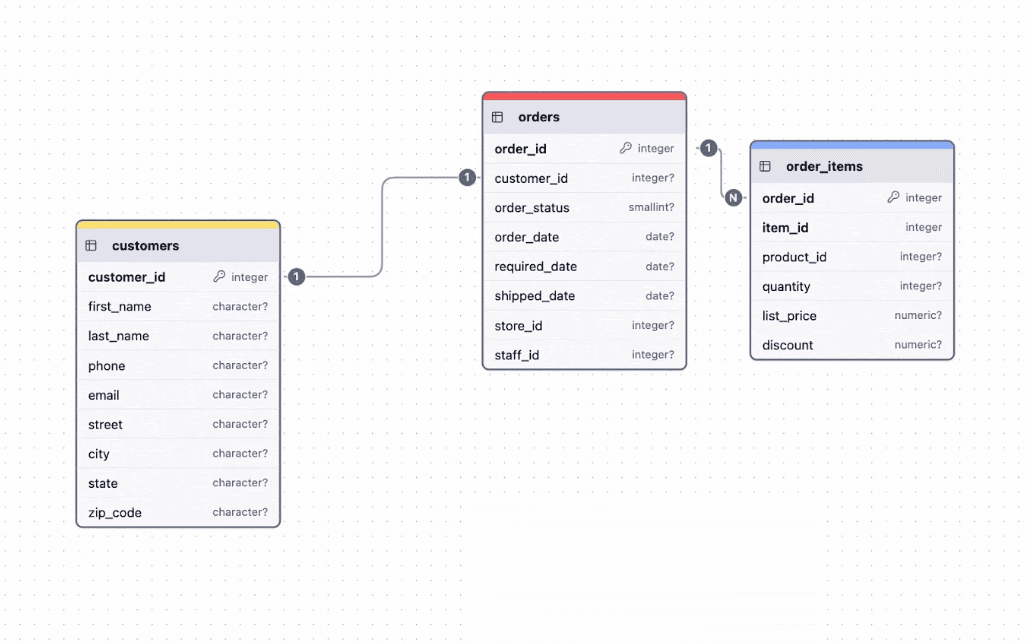
Database Modeling vs Database Schema
While both may appear similar, they function differently. It's important to understand both aspects.
Database modeling is the design process. It's the planning phase where you decide what data exists and how it relates.
Database schema is the actual structure inside your database. Tables, columns, indexes, foreign keys. The thing your application talks to.
Modeling comes first. Schema comes second. The model is the idea, the schema is the implementation.
Here's a way to picture it. Your model is the recipe. Your schema is the cake. You can have a recipe without baking, but you can't bake a good cake without one. Most database disasters start with people skipping straight to the oven.
Skip the modeling step and you'll end up reverse-engineering your own database six months later, trying to remember why user_settings and account_preferences are two separate tables.
6 Key Benefits of Database Modeling for Teams, Developers, and Business
This is where modeling pays for itself. Here are the six benefits I see that make the biggest difference.
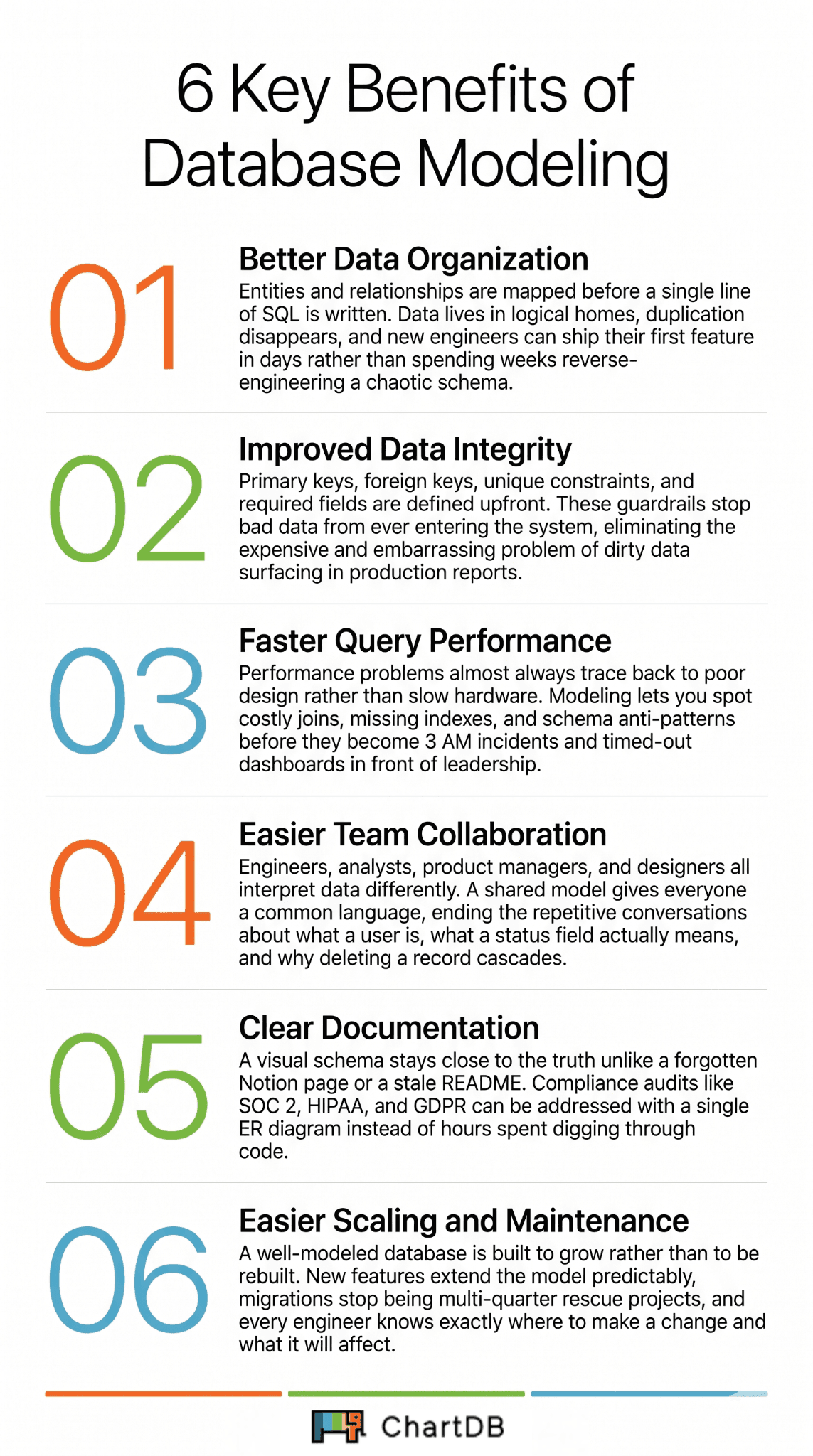
1. Better Data Organization
A modeled database is a tidy database.
When you map entities and relationships before writing SQL, you naturally avoid duplication. No more storing customer addresses in three different tables. No more orphaned columns nobody remembers adding, and no more temp_users_v2_final_FINAL.
Your data lives in logical homes. Anyone reading the schema can guess where something belongs without having to check five different tables. Normalization stops being a buzzword and becomes a built-in habit.
This pays off most when your team grows. A new engineer joining a well-organized database can ship their first feature in days. Drop them into a chaotic one, and they'll spend their first sprint just mapping out what exists.
2. Improved Data Integrity
Bad data is expensive because it can lead to wrong reports, broken features, angry customers, and embarrassing dashboards in front of the leadership team.
Modeling forces you to define constraints upfront. Primary keys, foreign keys, unique fields, required attributes, and check constraints. These rules become guardrails. They stop garbage data from sneaking in at the application layer, where it usually hides until it's too late.
Without modeling, integrity becomes someone's afternoon problem. Maybe the backend team adds validation. Maybe the frontend trims whitespace. Maybe nobody does. A modeled database doesn't just store data, it protects it at the source.
The cost of fixing dirty data later is always higher than the cost of preventing it now. Always.
3. Faster Query Performance
Performance issues usually trace back to bad design, not slow hardware.
When you model first, you spot performance bottlenecks before they exist. You decide which fields need indexes. You normalize where it makes sense and denormalize where speed matters more than purity. You catch the joins that would have killed your query times in production.
For example, an e-commerce app that stores order line items inside the orders table as JSON might feel clever at first. Faster writes, fewer joins. Then comes the day someone needs to report on sales by product. Suddenly, that JSON column is a performance nightmare. A proper model would have caught that on day one.
The result of modeling well? Queries that run in milliseconds instead of seconds. Database servers that handle ten times the load. Engineers who don't get paged at 3 AM because a report timed out.
4. Easier Collaboration Between Teams
Engineers, analysts, product managers, designers. Everyone touches data differently. And everyone interprets it differently, too.
A shared model gives them a common language. The data analyst knows what the orders table actually contains. The product manager understands why deleting a user cascades to their reviews. The new engineer onboards in days, not weeks. The designer stops asking why a "soft delete" is different from a "delete."
Without a model, every cross-team conversation starts with definitions. What's a "user" in this system? Is a guest checkout still a customer? Does the status field on orders mean payment status or fulfillment status? You stop having the same five conversations over and over once the model answers them.
This matters more as your company grows. Two engineers can keep things straight in their heads. Twenty engineers cannot. A shared model is what turns tribal knowledge into something a team can actually scale.
5. Clear Documentation of Database Structure
Your model is your documentation.
Most teams have a Notion page from 2022 that nobody updates. Or a Confluence doc that lies. Or a README.md in some forgotten repo. A live database model, especially a visual one, stays close to the truth because it's tied to the actual structure.
When auditors ask, when new hires are on board, when you're debugging at 2 AM, you have something accurate and easy to look at.
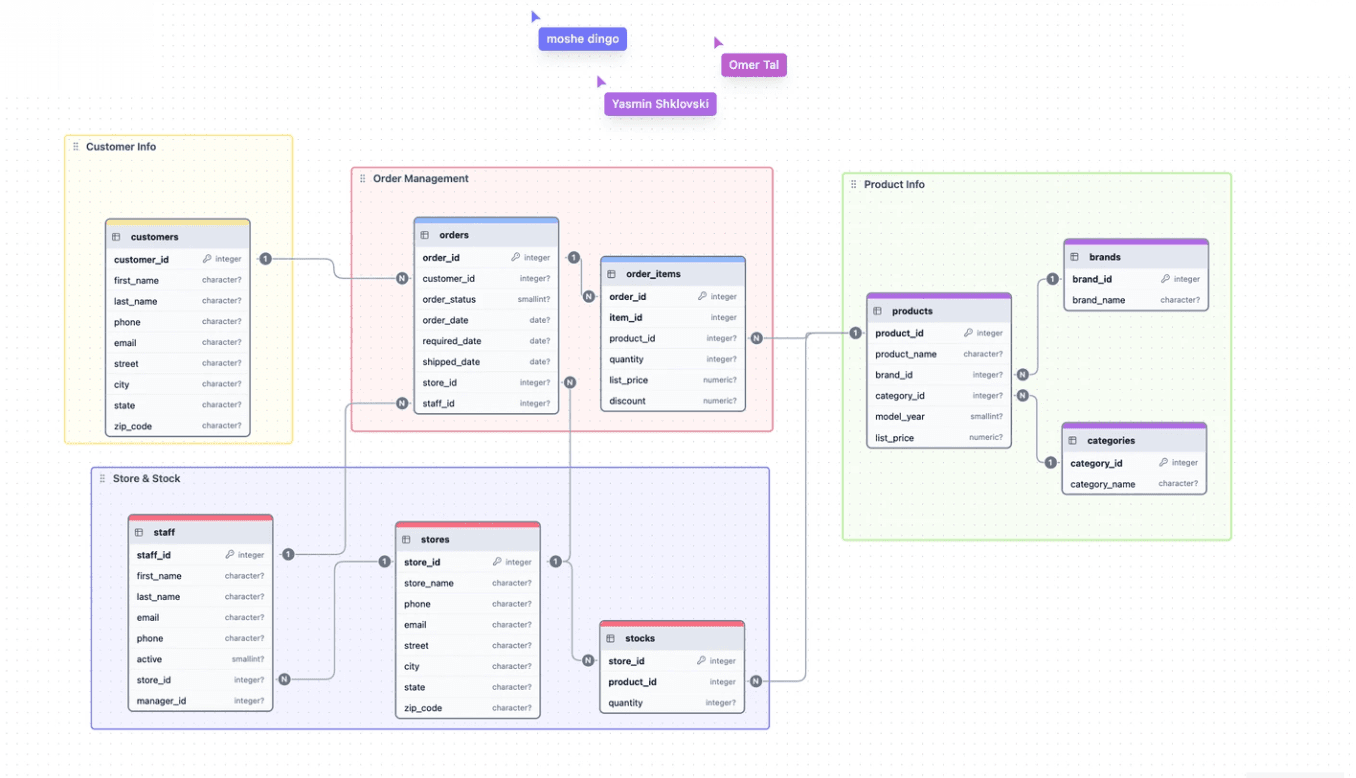
Compliance teams love this too. SOC 2, HIPAA, and GDPR audits all ask similar questions. Where is sensitive data stored? Who can access it? How do tables relate? A current ER diagram addresses most of these in a single screenshot. Saves your team hours of digging through code to assemble proof.
6. Easier Scaling and System Maintenance
A modeled database is built to grow. Adding a new feature means extending the model, not rebuilding it. Migrations are predictable. Refactors don't turn into multi-quarter projects with names like "The Great Schema Cleanup."
Maintenance is the same story. A well-modeled database makes it obvious where to add a new feature, where the risky dependencies sit, and what a change will affect. Without that clarity, every update feels like defusing a bomb. With it, changes become routine.
Good modeling today saves you a rewrite tomorrow. I've seen companies spend months rebuilding databases that should have been modeled properly in the first place. It's a brutal way to learn.
How to Visualize Database Models Using ChartDB
Once you've designed a model, you need a way to actually see it.
SQL is great for execution, terrible for understanding. Try reading a 60-table schema through SHOW CREATE TABLE statements.
This is where ER diagrams come in. They turn your database structure into something you can read at a glance. Tables become boxes, relationships become lines, and foreign keys become arrows that helps to get everything understood in seconds.
Visual models help teams:
explore database structures without reading raw SQL
understand relationships between tables instantly
document system architecture in a format that everyone can understand
spot redundancy and design flaws that hide inside text
The bigger your database, the more this matters. A 200-table system without a visual map is basically unmaintainable. Engineers stop trusting it. Changes get avoided, and technical debt compounds.
We built ChartDB so this would take seconds. Here's the flow:
Step 1: Open ChartDB. Go to the Chartdb website, and click on Start for free.
Step 2: Pick your database. ChartDB supports PostgreSQL, MySQL, MariaDB, SQL Server, SQLite, ClickHouse, CockroachDB, Oracle, Snowflake, and BigQuery. Pick yours from the list.
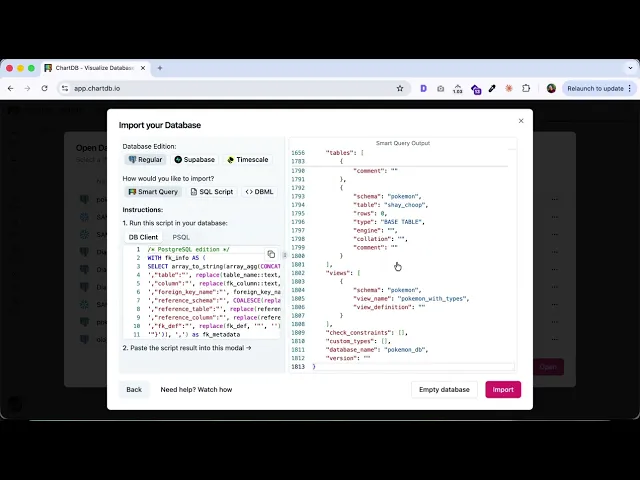
Step 3: Run our smart query. We've written a single query for each database that pulls your entire schema in one shot. Run it in your database client, and copy the result. Your credentials never leave your machine, which is exactly how your security team wants it.
Step 4: Paste it back into ChartDB. Drop the result into the import field. ChartDB instantly generates a clean, interactive ER diagram of your full schema. Tables, columns, relationships, all laid out automatically. Takes about 15 seconds end-to-end.
Step 5: Edit, organize, and share. Drag tables around, group related entities into subject areas, add notes, and export the diagram as an image, SQL DDL script, or shareable live link. Embed it in Notion, drop it in Slack, send it to a new hire on day one.
If you don't even have a database yet, you can skip the import step entirely. Our AI ER Diagram Generator builds a full schema from a plain-English description. Tell it what your app does, and it returns a working diagram you can edit, refine, and export as SQL.
Final Thoughts
Database modeling isn't a nice-to-have. It's the difference between a system that grows with your business and one that becomes a liability.
Good models give you better data organization, smoother team collaboration, and systems that scale without rewrites. The teams that skip this step usually pay for it later, with interest. The ones that take an afternoon to model properly save themselves months of pain.
Before you build your next database, model it. Visualize it. Share it with your team. Catch the problems on the diagram, not in production.
Try ChartDB for free and turn your database into something you can actually see.
Want to go deeper? Check out these tutorials:
FAQs
Can database modeling be automated using AI tools?
Partly, yes. AI tools can generate initial schemas from descriptions or reverse-engineer models from existing databases. ChartDB's AI ER Diagram Generator, for example, creates ER diagrams from natural language prompts in seconds. That said, AI is a starting point, not a replacement. Real modeling still needs human judgment for business logic, edge cases, performance trade-offs, and the messy realities of how your team actually works.
What role do ER diagrams play in database modeling?
ER diagrams are the visual layer of database modeling. They show entities, attributes, and relationships in a format anyone can read, technical or not. Most teams use them to design new databases, document existing ones, audit data flows, and onboard new developers without a 50-page wiki. They're also the fastest way to spot design flaws before they ship.
Do small projects really need database modeling?
Even tiny projects benefit from a quick model. A 15-minute diagram before you write a single line of SQL saves hours of refactoring later. The bigger the project, the bigger the payoff, but the habit is worth building from day one. Side projects also have a funny way of becoming real products. The model you draw on a Tuesday afternoon could save you a rewrite when your weekend app starts paying the bills.
Most teams start building databases by opening a SQL editor and typing CREATE TABLE. Without any plan or diagram. They just code.
I've been there, and it feels productive at first. Then a month in, you're knee-deep in tangled relationships, redundant fields, and a schema nobody fully understands anymore.
And that's when things start falling apart: migrations break without warning, queries slow to a crawl, and a new developer spends their first week just trying to understand where the user data actually lives.
I'm Jonathan, co-founder of ChartDB. My co-founder and I built Chartdb because we kept running into the same wall ourselves. Every time we joined a new project, understanding the database schema took days. The diagrams were outdated, if they existed at all.
We launched the open-source version in August 2024, hit the front page of Hacker News in 72 hours, and have grown to 22,000+ GitHub stars and a community of developers who shared the same pain. Because the fix isn't more discipline or better SQL skills, but database modeling.
In this guide, I'll cover:
What database modeling actually is
How it differs from database schema design
The six biggest benefits for modern teams
How to visualize your models using ER diagrams
Let's get into it.
What Is Database Modeling?
Database modeling is the process of designing how your data should be structured before you build the database.
Think of it like architectural drawings. You wouldn't pour concrete without a blueprint. The same logic applies to data.
A good model defines four things:
Entities: the objects you're storing (users, orders, products)
Attributes: the properties of each entity (name, email, price)
Relationships: how entities connect to each other
Constraints: the rules that keep your data clean
Once you have a model, it becomes the blueprint for your database schema. Build the model right, and the schema almost writes itself.
Modeling usually happens in three layers.
The conceptual model is the high-level picture, the stuff a non-technical stakeholder can follow.
The logical model adds detail: data types, keys, and normalization rules.
The physical model is the final version, mapped to a specific database engine, such as PostgreSQL or MySQL. Most teams move through all three, even if they don't formally name them.
Database Modeling vs Database Schema
While both may appear similar, they function differently. It's important to understand both aspects.
Database modeling is the design process. It's the planning phase where you decide what data exists and how it relates.
Database schema is the actual structure inside your database. Tables, columns, indexes, foreign keys. The thing your application talks to.
Modeling comes first. Schema comes second. The model is the idea, the schema is the implementation.
Here's a way to picture it. Your model is the recipe. Your schema is the cake. You can have a recipe without baking, but you can't bake a good cake without one. Most database disasters start with people skipping straight to the oven.
Skip the modeling step and you'll end up reverse-engineering your own database six months later, trying to remember why user_settings and account_preferences are two separate tables.
6 Key Benefits of Database Modeling for Teams, Developers, and Business
This is where modeling pays for itself. Here are the six benefits I see that make the biggest difference.
1. Better Data Organization
A modeled database is a tidy database.
When you map entities and relationships before writing SQL, you naturally avoid duplication. No more storing customer addresses in three different tables. No more orphaned columns nobody remembers adding, and no more temp_users_v2_final_FINAL.
Your data lives in logical homes. Anyone reading the schema can guess where something belongs without having to check five different tables. Normalization stops being a buzzword and becomes a built-in habit.
This pays off most when your team grows. A new engineer joining a well-organized database can ship their first feature in days. Drop them into a chaotic one, and they'll spend their first sprint just mapping out what exists.
2. Improved Data Integrity
Bad data is expensive because it can lead to wrong reports, broken features, angry customers, and embarrassing dashboards in front of the leadership team.
Modeling forces you to define constraints upfront. Primary keys, foreign keys, unique fields, required attributes, and check constraints. These rules become guardrails. They stop garbage data from sneaking in at the application layer, where it usually hides until it's too late.
Without modeling, integrity becomes someone's afternoon problem. Maybe the backend team adds validation. Maybe the frontend trims whitespace. Maybe nobody does. A modeled database doesn't just store data, it protects it at the source.
The cost of fixing dirty data later is always higher than the cost of preventing it now. Always.
3. Faster Query Performance
Performance issues usually trace back to bad design, not slow hardware.
When you model first, you spot performance bottlenecks before they exist. You decide which fields need indexes. You normalize where it makes sense and denormalize where speed matters more than purity. You catch the joins that would have killed your query times in production.
For example, an e-commerce app that stores order line items inside the orders table as JSON might feel clever at first. Faster writes, fewer joins. Then comes the day someone needs to report on sales by product. Suddenly, that JSON column is a performance nightmare. A proper model would have caught that on day one.
The result of modeling well? Queries that run in milliseconds instead of seconds. Database servers that handle ten times the load. Engineers who don't get paged at 3 AM because a report timed out.
4. Easier Collaboration Between Teams
Engineers, analysts, product managers, designers. Everyone touches data differently. And everyone interprets it differently, too.
A shared model gives them a common language. The data analyst knows what the orders table actually contains. The product manager understands why deleting a user cascades to their reviews. The new engineer onboards in days, not weeks. The designer stops asking why a "soft delete" is different from a "delete."
Without a model, every cross-team conversation starts with definitions. What's a "user" in this system? Is a guest checkout still a customer? Does the status field on orders mean payment status or fulfillment status? You stop having the same five conversations over and over once the model answers them.
This matters more as your company grows. Two engineers can keep things straight in their heads. Twenty engineers cannot. A shared model is what turns tribal knowledge into something a team can actually scale.
5. Clear Documentation of Database Structure
Your model is your documentation.
Most teams have a Notion page from 2022 that nobody updates. Or a Confluence doc that lies. Or a README.md in some forgotten repo. A live database model, especially a visual one, stays close to the truth because it's tied to the actual structure.
When auditors ask, when new hires are on board, when you're debugging at 2 AM, you have something accurate and easy to look at.
Compliance teams love this too. SOC 2, HIPAA, and GDPR audits all ask similar questions. Where is sensitive data stored? Who can access it? How do tables relate? A current ER diagram addresses most of these in a single screenshot. Saves your team hours of digging through code to assemble proof.
6. Easier Scaling and System Maintenance
A modeled database is built to grow. Adding a new feature means extending the model, not rebuilding it. Migrations are predictable. Refactors don't turn into multi-quarter projects with names like "The Great Schema Cleanup."
Maintenance is the same story. A well-modeled database makes it obvious where to add a new feature, where the risky dependencies sit, and what a change will affect. Without that clarity, every update feels like defusing a bomb. With it, changes become routine.
Good modeling today saves you a rewrite tomorrow. I've seen companies spend months rebuilding databases that should have been modeled properly in the first place. It's a brutal way to learn.
How to Visualize Database Models Using ChartDB
Once you've designed a model, you need a way to actually see it.
SQL is great for execution, terrible for understanding. Try reading a 60-table schema through SHOW CREATE TABLE statements.
This is where ER diagrams come in. They turn your database structure into something you can read at a glance. Tables become boxes, relationships become lines, and foreign keys become arrows that helps to get everything understood in seconds.
Visual models help teams:
explore database structures without reading raw SQL
understand relationships between tables instantly
document system architecture in a format that everyone can understand
spot redundancy and design flaws that hide inside text
The bigger your database, the more this matters. A 200-table system without a visual map is basically unmaintainable. Engineers stop trusting it. Changes get avoided, and technical debt compounds.
We built ChartDB so this would take seconds. Here's the flow:
Step 1: Open ChartDB. Go to the Chartdb website, and click on Start for free.
Step 2: Pick your database. ChartDB supports PostgreSQL, MySQL, MariaDB, SQL Server, SQLite, ClickHouse, CockroachDB, Oracle, Snowflake, and BigQuery. Pick yours from the list.
Step 3: Run our smart query. We've written a single query for each database that pulls your entire schema in one shot. Run it in your database client, and copy the result. Your credentials never leave your machine, which is exactly how your security team wants it.
Step 4: Paste it back into ChartDB. Drop the result into the import field. ChartDB instantly generates a clean, interactive ER diagram of your full schema. Tables, columns, relationships, all laid out automatically. Takes about 15 seconds end-to-end.
Step 5: Edit, organize, and share. Drag tables around, group related entities into subject areas, add notes, and export the diagram as an image, SQL DDL script, or shareable live link. Embed it in Notion, drop it in Slack, send it to a new hire on day one.
If you don't even have a database yet, you can skip the import step entirely. Our AI ER Diagram Generator builds a full schema from a plain-English description. Tell it what your app does, and it returns a working diagram you can edit, refine, and export as SQL.
Final Thoughts
Database modeling isn't a nice-to-have. It's the difference between a system that grows with your business and one that becomes a liability.
Good models give you better data organization, smoother team collaboration, and systems that scale without rewrites. The teams that skip this step usually pay for it later, with interest. The ones that take an afternoon to model properly save themselves months of pain.
Before you build your next database, model it. Visualize it. Share it with your team. Catch the problems on the diagram, not in production.
Try ChartDB for free and turn your database into something you can actually see.
Want to go deeper? Check out these tutorials:
FAQs
Can database modeling be automated using AI tools?
Partly, yes. AI tools can generate initial schemas from descriptions or reverse-engineer models from existing databases. ChartDB's AI ER Diagram Generator, for example, creates ER diagrams from natural language prompts in seconds. That said, AI is a starting point, not a replacement. Real modeling still needs human judgment for business logic, edge cases, performance trade-offs, and the messy realities of how your team actually works.
What role do ER diagrams play in database modeling?
ER diagrams are the visual layer of database modeling. They show entities, attributes, and relationships in a format anyone can read, technical or not. Most teams use them to design new databases, document existing ones, audit data flows, and onboard new developers without a 50-page wiki. They're also the fastest way to spot design flaws before they ship.
Do small projects really need database modeling?
Even tiny projects benefit from a quick model. A 15-minute diagram before you write a single line of SQL saves hours of refactoring later. The bigger the project, the bigger the payoff, but the habit is worth building from day one. Side projects also have a funny way of becoming real products. The model you draw on a Tuesday afternoon could save you a rewrite when your weekend app starts paying the bills.
Most teams start building databases by opening a SQL editor and typing CREATE TABLE. Without any plan or diagram. They just code.
I've been there, and it feels productive at first. Then a month in, you're knee-deep in tangled relationships, redundant fields, and a schema nobody fully understands anymore.
And that's when things start falling apart: migrations break without warning, queries slow to a crawl, and a new developer spends their first week just trying to understand where the user data actually lives.
I'm Jonathan, co-founder of ChartDB. My co-founder and I built Chartdb because we kept running into the same wall ourselves. Every time we joined a new project, understanding the database schema took days. The diagrams were outdated, if they existed at all.
We launched the open-source version in August 2024, hit the front page of Hacker News in 72 hours, and have grown to 22,000+ GitHub stars and a community of developers who shared the same pain. Because the fix isn't more discipline or better SQL skills, but database modeling.
In this guide, I'll cover:
What database modeling actually is
How it differs from database schema design
The six biggest benefits for modern teams
How to visualize your models using ER diagrams
Let's get into it.
What Is Database Modeling?
Database modeling is the process of designing how your data should be structured before you build the database.
Think of it like architectural drawings. You wouldn't pour concrete without a blueprint. The same logic applies to data.
A good model defines four things:
Entities: the objects you're storing (users, orders, products)
Attributes: the properties of each entity (name, email, price)
Relationships: how entities connect to each other
Constraints: the rules that keep your data clean
Once you have a model, it becomes the blueprint for your database schema. Build the model right, and the schema almost writes itself.
Modeling usually happens in three layers.
The conceptual model is the high-level picture, the stuff a non-technical stakeholder can follow.
The logical model adds detail: data types, keys, and normalization rules.
The physical model is the final version, mapped to a specific database engine, such as PostgreSQL or MySQL. Most teams move through all three, even if they don't formally name them.
Database Modeling vs Database Schema
While both may appear similar, they function differently. It's important to understand both aspects.
Database modeling is the design process. It's the planning phase where you decide what data exists and how it relates.
Database schema is the actual structure inside your database. Tables, columns, indexes, foreign keys. The thing your application talks to.
Modeling comes first. Schema comes second. The model is the idea, the schema is the implementation.
Here's a way to picture it. Your model is the recipe. Your schema is the cake. You can have a recipe without baking, but you can't bake a good cake without one. Most database disasters start with people skipping straight to the oven.
Skip the modeling step and you'll end up reverse-engineering your own database six months later, trying to remember why user_settings and account_preferences are two separate tables.
6 Key Benefits of Database Modeling for Teams, Developers, and Business
This is where modeling pays for itself. Here are the six benefits I see that make the biggest difference.
1. Better Data Organization
A modeled database is a tidy database.
When you map entities and relationships before writing SQL, you naturally avoid duplication. No more storing customer addresses in three different tables. No more orphaned columns nobody remembers adding, and no more temp_users_v2_final_FINAL.
Your data lives in logical homes. Anyone reading the schema can guess where something belongs without having to check five different tables. Normalization stops being a buzzword and becomes a built-in habit.
This pays off most when your team grows. A new engineer joining a well-organized database can ship their first feature in days. Drop them into a chaotic one, and they'll spend their first sprint just mapping out what exists.
2. Improved Data Integrity
Bad data is expensive because it can lead to wrong reports, broken features, angry customers, and embarrassing dashboards in front of the leadership team.
Modeling forces you to define constraints upfront. Primary keys, foreign keys, unique fields, required attributes, and check constraints. These rules become guardrails. They stop garbage data from sneaking in at the application layer, where it usually hides until it's too late.
Without modeling, integrity becomes someone's afternoon problem. Maybe the backend team adds validation. Maybe the frontend trims whitespace. Maybe nobody does. A modeled database doesn't just store data, it protects it at the source.
The cost of fixing dirty data later is always higher than the cost of preventing it now. Always.
3. Faster Query Performance
Performance issues usually trace back to bad design, not slow hardware.
When you model first, you spot performance bottlenecks before they exist. You decide which fields need indexes. You normalize where it makes sense and denormalize where speed matters more than purity. You catch the joins that would have killed your query times in production.
For example, an e-commerce app that stores order line items inside the orders table as JSON might feel clever at first. Faster writes, fewer joins. Then comes the day someone needs to report on sales by product. Suddenly, that JSON column is a performance nightmare. A proper model would have caught that on day one.
The result of modeling well? Queries that run in milliseconds instead of seconds. Database servers that handle ten times the load. Engineers who don't get paged at 3 AM because a report timed out.
4. Easier Collaboration Between Teams
Engineers, analysts, product managers, designers. Everyone touches data differently. And everyone interprets it differently, too.
A shared model gives them a common language. The data analyst knows what the orders table actually contains. The product manager understands why deleting a user cascades to their reviews. The new engineer onboards in days, not weeks. The designer stops asking why a "soft delete" is different from a "delete."
Without a model, every cross-team conversation starts with definitions. What's a "user" in this system? Is a guest checkout still a customer? Does the status field on orders mean payment status or fulfillment status? You stop having the same five conversations over and over once the model answers them.
This matters more as your company grows. Two engineers can keep things straight in their heads. Twenty engineers cannot. A shared model is what turns tribal knowledge into something a team can actually scale.
5. Clear Documentation of Database Structure
Your model is your documentation.
Most teams have a Notion page from 2022 that nobody updates. Or a Confluence doc that lies. Or a README.md in some forgotten repo. A live database model, especially a visual one, stays close to the truth because it's tied to the actual structure.
When auditors ask, when new hires are on board, when you're debugging at 2 AM, you have something accurate and easy to look at.
Compliance teams love this too. SOC 2, HIPAA, and GDPR audits all ask similar questions. Where is sensitive data stored? Who can access it? How do tables relate? A current ER diagram addresses most of these in a single screenshot. Saves your team hours of digging through code to assemble proof.
6. Easier Scaling and System Maintenance
A modeled database is built to grow. Adding a new feature means extending the model, not rebuilding it. Migrations are predictable. Refactors don't turn into multi-quarter projects with names like "The Great Schema Cleanup."
Maintenance is the same story. A well-modeled database makes it obvious where to add a new feature, where the risky dependencies sit, and what a change will affect. Without that clarity, every update feels like defusing a bomb. With it, changes become routine.
Good modeling today saves you a rewrite tomorrow. I've seen companies spend months rebuilding databases that should have been modeled properly in the first place. It's a brutal way to learn.
How to Visualize Database Models Using ChartDB
Once you've designed a model, you need a way to actually see it.
SQL is great for execution, terrible for understanding. Try reading a 60-table schema through SHOW CREATE TABLE statements.
This is where ER diagrams come in. They turn your database structure into something you can read at a glance. Tables become boxes, relationships become lines, and foreign keys become arrows that helps to get everything understood in seconds.
Visual models help teams:
explore database structures without reading raw SQL
understand relationships between tables instantly
document system architecture in a format that everyone can understand
spot redundancy and design flaws that hide inside text
The bigger your database, the more this matters. A 200-table system without a visual map is basically unmaintainable. Engineers stop trusting it. Changes get avoided, and technical debt compounds.
We built ChartDB so this would take seconds. Here's the flow:
Step 1: Open ChartDB. Go to the Chartdb website, and click on Start for free.
Step 2: Pick your database. ChartDB supports PostgreSQL, MySQL, MariaDB, SQL Server, SQLite, ClickHouse, CockroachDB, Oracle, Snowflake, and BigQuery. Pick yours from the list.
Step 3: Run our smart query. We've written a single query for each database that pulls your entire schema in one shot. Run it in your database client, and copy the result. Your credentials never leave your machine, which is exactly how your security team wants it.
Step 4: Paste it back into ChartDB. Drop the result into the import field. ChartDB instantly generates a clean, interactive ER diagram of your full schema. Tables, columns, relationships, all laid out automatically. Takes about 15 seconds end-to-end.
Step 5: Edit, organize, and share. Drag tables around, group related entities into subject areas, add notes, and export the diagram as an image, SQL DDL script, or shareable live link. Embed it in Notion, drop it in Slack, send it to a new hire on day one.
If you don't even have a database yet, you can skip the import step entirely. Our AI ER Diagram Generator builds a full schema from a plain-English description. Tell it what your app does, and it returns a working diagram you can edit, refine, and export as SQL.
Final Thoughts
Database modeling isn't a nice-to-have. It's the difference between a system that grows with your business and one that becomes a liability.
Good models give you better data organization, smoother team collaboration, and systems that scale without rewrites. The teams that skip this step usually pay for it later, with interest. The ones that take an afternoon to model properly save themselves months of pain.
Before you build your next database, model it. Visualize it. Share it with your team. Catch the problems on the diagram, not in production.
Try ChartDB for free and turn your database into something you can actually see.
Want to go deeper? Check out these tutorials:
FAQs
Can database modeling be automated using AI tools?
Partly, yes. AI tools can generate initial schemas from descriptions or reverse-engineer models from existing databases. ChartDB's AI ER Diagram Generator, for example, creates ER diagrams from natural language prompts in seconds. That said, AI is a starting point, not a replacement. Real modeling still needs human judgment for business logic, edge cases, performance trade-offs, and the messy realities of how your team actually works.
What role do ER diagrams play in database modeling?
ER diagrams are the visual layer of database modeling. They show entities, attributes, and relationships in a format anyone can read, technical or not. Most teams use them to design new databases, document existing ones, audit data flows, and onboard new developers without a 50-page wiki. They're also the fastest way to spot design flaws before they ship.
Do small projects really need database modeling?
Even tiny projects benefit from a quick model. A 15-minute diagram before you write a single line of SQL saves hours of refactoring later. The bigger the project, the bigger the payoff, but the habit is worth building from day one. Side projects also have a funny way of becoming real products. The model you draw on a Tuesday afternoon could save you a rewrite when your weekend app starts paying the bills.

Continue Reading

© 2026 ChartDB
Product
Free Tools
© 2025 ChartDB
Product
Free Tools
© 2025 ChartDB