
Apr 21, 2026
What Is a Database Schema? Types, Examples, and Best Practices
What Is a Database Schema? Types, Examples, and Best Practices
What Is a Database Schema? Types, Examples, and Best Practices
Learn what a database schema is, the different types, and best practices for designing one that scales with your application.
Learn what a database schema is, the different types, and best practices for designing one that scales with your application.
Learn what a database schema is, the different types, and best practices for designing one that scales with your application.

Jonathan Fishner
7 minutes read
Every application you've ever used, your banking app, your project management tool, the e-commerce store you ordered from last week, is built on top of a database.
And at the heart of every database is a schema.
If you're just getting started with databases, or you've been handed a codebase and someone casually dropped the word "schema" without explaining it, this guide is for you.
I'm Jonathan, founder of ChartDB, a tool that helps developers visualize and understand database schemas without having to dig through raw SQL.
In this article, I'll walk you through what a database schema actually is, the different types, how it differs from a database instance, and the design practices our team sees working well across engineering teams.
By the end, you'll have a clear model and a better way to work with it. Let’s get into it.
What Is a Database Schema?
A database schema is the blueprint of your database. It defines the structure, what tables exist, what columns each table has, what data types those columns accept, and how different tables relate to each other.
Think of it this way, as if your database were a hotel, the schema would be the architectural plan, like how many floors, how many rooms per floor, what each room contains. Are the guests staying inside those rooms at any given moment? That's your data.
Here's what a schema typically defines:
Tables - the core containers of your data (think: Users, Orders, Products). Each table represents a specific thing in your system.
Database Indexes - structures that speed up data retrieval, like a book index pointing to the right page. Missing indexes are one of the most common causes of slow queries. I've written about how to find missing indexes.
Foreign keys - the links between tables that define relationships (an Order row points back to a User row)
These three are the core building blocks of any schema. Get comfortable with them, and you'll be able to read or design a schema for almost any application.
Types of Database Schema
There isn't just one "type" of schema. In database design, there's a concept called the three-schema architecture, which separates how data is described at different levels of abstraction. Each layer serves a different audience.
In practice, most developers and documentation simplify this into three more intuitive terms: Conceptual, Logical, and Physical. It maps more closely to how teams actually think about schema design day to day.
Let’s understand it in detail.
Conceptual Schema
This is the big-picture view of what data exists and how entities relate to each other, without any technical detail. It's what you'd sketch on a whiteboard at the start of a project.
A conceptual schema says: "We have Users. Users place Orders. Orders contain Products." No column names, no data types. Just entities and their relationships.
This is mainly useful for non-technical stakeholders, architects, product owners, and early-stage planning conversations for aligning everyone on what the system needs to track.
Logical Schema
The logical schema takes a conceptual sketch and adds structure. It defines the actual tables and columns, data types, primary keys, relationships, and integrity constraints, without worrying about which specific database engine you're using.
It answers what exactly each piece of data will look like
This is where most developers spend their time when designing a system. It's technology-agnostic, so it works whether you're planning for PostgreSQL, MySQL, or anything else. It is generally created by Database designers and software architects to turn business requirements into clear, technology-independent structural plans.
Physical Schema
The physical schema is the implementation layer, how the database is actually stored on disk. This includes indexing strategies, storage engines, partitioning, and performance tuning decisions specific to your chosen database.
It is created by Database administrators and backend engineers to translate the logical plan into a real, running database infrastructure.
Database Schema vs Database Instance
This is one of the most common points of confusion for people new to databases, so let's clear it up once and for all.
Schema = structure. It defines what the database looks like, the tables, columns, types, and constraints. It's relatively stable and doesn't change frequently, though when it does change, those changes are handled through migrations (more on that in the FAQ).
Instance = the actual data at a given point in time. Right now, your Users table might have 50,000 rows. Tomorrow it might have 51,000. The schema didn't change, but the instance did.
You can understand this with a simple analogy. A schema is like a blank form, a template with fields like Name, Email, Phone. An instance is like a filled-in copy of that form. The form stays the same. The information people write in it changes every time.
Database Schema Design Best Practices
A well-organized schema makes everything easier, queries run faster, bugs are easier to find, and new developers are onboarded in a fraction of the time. A poorly designed one becomes technical debt that compounds for years.
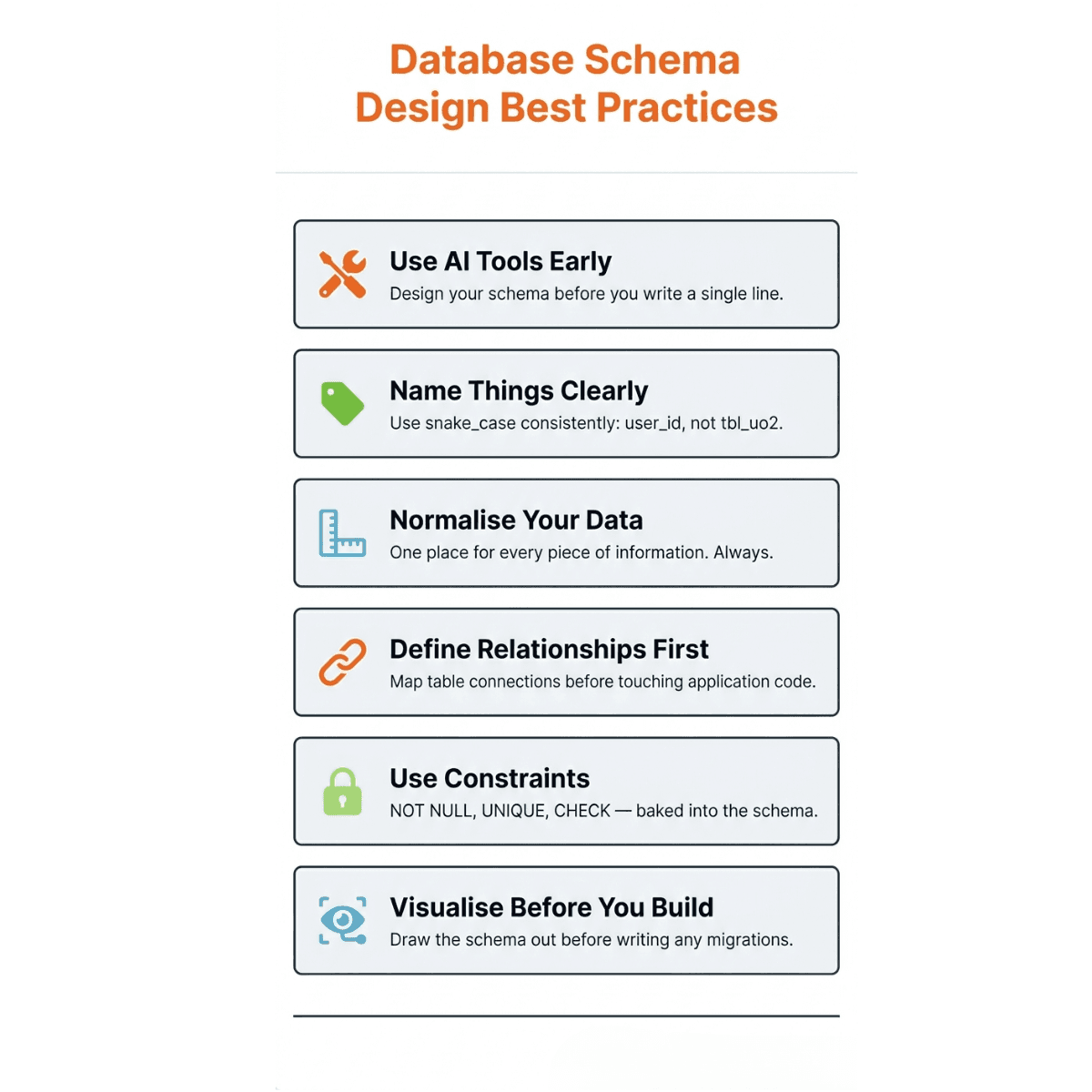
Here's what good schema design looks like in practice:
Use AI tools to design and visualize schemas early: Before you write a single line of SQL, spend time visualizing your schema. AI ERD tools let you generate and visualize your schema from existing SQL, so you can spot problems before they become expensive.
Use clear, consistent naming conventions: Call a table user_orders, not tbl_uo2. The most widely accepted standard for relational databases is snake_case: user_id, created_at, order_status. Pick one and stick to it across the entire schema.
Normalize data where possible: Don't store the same piece of information in three different tables. Normalization reduces redundancy and makes updates safer. If a user changes their email, you want to update it in one place, not everyone. That said, in performance-critical systems, teams sometimes intentionally denormalize parts of a schema for speed.
Define relationships early: Know how your tables connect before you start writing application code. Retrofitting foreign keys into a live database is painful. A simple way to stay on top of this is to color-code tables by domain in your ER diagram, all user-related tables in one color, all order-related tables in another, so relationships between them are immediately obvious at a glance.
Use constraints: These are rules baked into the schema that prevent bad data from being written. NOT NULL, UNIQUE, and CHECK constraints are your first line of defense against corrupted records.
Visualize before you implement: Before writing a single migration file, draw out the schema. Whether it's a whiteboard sketch or a proper ER diagram tool, a visual representation will surface gaps and awkward relationships that are invisible in SQL alone.
These best practices will help you create a fast and error-free database schema. To maximize its effectiveness, also check the most common database design mistakes, as many of these issues arise from skipping the steps above.
Plus, designing a schema involves a lot of SQL writing. You can use these tools to take the manual work out of it ⬇️
How Teams Visualize Database Schemas (Example Using ChartDB)
As databases grow, and they always do, schemas become hard to reason about from SQL alone. A 30-table schema in raw SQL is effectively unreadable to anyone who didn't write it.
Reason being engineering teams need a tool to:
Explore how the database is structured
Understand table relationships at a glance
Document architecture for new team members
As a developer, I'd been there myself, staring at a database with no documentation, tracing foreign keys through raw SQL just to understand how data flowed. My co-founder felt the same way.
The tools out there were either too heavy or too manual, and none of them let you visualize a live database without handing over credentials or spending an hour on setup.
So we built ChartDB, a data visualization and data modeling tool built specifically for developers.
What separates it from other tools is that you never need to hand over database credentials or install anything. It works with all major databases, including PostgreSQL, MySQL, SQL Server, SQLite, MariaDB, and BigQuery, and runs entirely in the browser.
On top of visualization, it lets you collaborate with teammates in real time, track schema changes over time, detect missing indexes and foreign keys with AI, and embed live diagrams directly into Notion, Miro, or Confluence so your documentation stays in sync with your actual database, automatically.
Here's a quick example of how teams use it:
Step 1 - Import your schema. Paste your CREATE TABLE SQL or connect your live database. ChartDB parses it and generates a visual instantly.
Step 2 - Explore relationships. Every foreign key becomes a visible line between tables. You can trace how data flows through your system without reading 500 lines of SQL.
Step 3 - Edit and document. Rename tables, add notes, and reorganize the layout. The diagram becomes living documentation that your whole team can reference.
If you're starting from scratch and want a head start, check out ChartDB's ready-to-use schema templates. There are templates for common use cases, such as e-commerce, SaaS, and authentication systems, that you can import and customize.
Final Thoughts
A database schema is the foundation on which every application, script, and service in your system is built. Getting it right early saves your team from painful migrations, broken queries, and hours to understand a database someone built two years ago.
ChartDB makes it easier to see what you're building and what you've already built. Try ChartDB for free and generate an ER diagram from your existing database in no time.
Frequently Asked Questions
Can a database have multiple schemas?
Yes. Most modern databases, like PostgreSQL, allow you to organize tables into multiple schemas within the same database, similar to folders within a directory. This is useful for separating concerns, like keeping public schema tables separate from analytics schema tables.
Which tools can be used to create a database schema?
There are several options depending on your stage. For visualization and documentation, ChartDB lets you generate ER diagrams from existing SQL instantly. Other tools include dbdiagram.io for quick sketching and database-native tools like pgAdmin for PostgreSQL. ChartDB's AI capabilities also help you detect missing indexes and design improvements.
What happens if a database schema changes?
Schema changes are handled through migration scripts that alter the database structure in a controlled way. Popular tools include Alembic, Flyway, and Liquibase, and most frameworks have their own migration layer too, like Django's built-in migrations.
The key thing is to version and test every change carefully. Poorly planned migrations can break application code. ChartDB helps on the documentation side: it keeps your ER diagram in sync with your live database, so your team always has an accurate picture of the current schema.
Every application you've ever used, your banking app, your project management tool, the e-commerce store you ordered from last week, is built on top of a database.
And at the heart of every database is a schema.
If you're just getting started with databases, or you've been handed a codebase and someone casually dropped the word "schema" without explaining it, this guide is for you.
I'm Jonathan, founder of ChartDB, a tool that helps developers visualize and understand database schemas without having to dig through raw SQL.
In this article, I'll walk you through what a database schema actually is, the different types, how it differs from a database instance, and the design practices our team sees working well across engineering teams.
By the end, you'll have a clear model and a better way to work with it. Let’s get into it.
What Is a Database Schema?
A database schema is the blueprint of your database. It defines the structure, what tables exist, what columns each table has, what data types those columns accept, and how different tables relate to each other.
Think of it this way, as if your database were a hotel, the schema would be the architectural plan, like how many floors, how many rooms per floor, what each room contains. Are the guests staying inside those rooms at any given moment? That's your data.
Here's what a schema typically defines:
Tables - the core containers of your data (think: Users, Orders, Products). Each table represents a specific thing in your system.
Database Indexes - structures that speed up data retrieval, like a book index pointing to the right page. Missing indexes are one of the most common causes of slow queries. I've written about how to find missing indexes.
Foreign keys - the links between tables that define relationships (an Order row points back to a User row)
These three are the core building blocks of any schema. Get comfortable with them, and you'll be able to read or design a schema for almost any application.
Types of Database Schema
There isn't just one "type" of schema. In database design, there's a concept called the three-schema architecture, which separates how data is described at different levels of abstraction. Each layer serves a different audience.
In practice, most developers and documentation simplify this into three more intuitive terms: Conceptual, Logical, and Physical. It maps more closely to how teams actually think about schema design day to day.
Let’s understand it in detail.
Conceptual Schema
This is the big-picture view of what data exists and how entities relate to each other, without any technical detail. It's what you'd sketch on a whiteboard at the start of a project.
A conceptual schema says: "We have Users. Users place Orders. Orders contain Products." No column names, no data types. Just entities and their relationships.
This is mainly useful for non-technical stakeholders, architects, product owners, and early-stage planning conversations for aligning everyone on what the system needs to track.
Logical Schema
The logical schema takes a conceptual sketch and adds structure. It defines the actual tables and columns, data types, primary keys, relationships, and integrity constraints, without worrying about which specific database engine you're using.
It answers what exactly each piece of data will look like
This is where most developers spend their time when designing a system. It's technology-agnostic, so it works whether you're planning for PostgreSQL, MySQL, or anything else. It is generally created by Database designers and software architects to turn business requirements into clear, technology-independent structural plans.
Physical Schema
The physical schema is the implementation layer, how the database is actually stored on disk. This includes indexing strategies, storage engines, partitioning, and performance tuning decisions specific to your chosen database.
It is created by Database administrators and backend engineers to translate the logical plan into a real, running database infrastructure.
Database Schema vs Database Instance
This is one of the most common points of confusion for people new to databases, so let's clear it up once and for all.
Schema = structure. It defines what the database looks like, the tables, columns, types, and constraints. It's relatively stable and doesn't change frequently, though when it does change, those changes are handled through migrations (more on that in the FAQ).
Instance = the actual data at a given point in time. Right now, your Users table might have 50,000 rows. Tomorrow it might have 51,000. The schema didn't change, but the instance did.
You can understand this with a simple analogy. A schema is like a blank form, a template with fields like Name, Email, Phone. An instance is like a filled-in copy of that form. The form stays the same. The information people write in it changes every time.
Database Schema Design Best Practices
A well-organized schema makes everything easier, queries run faster, bugs are easier to find, and new developers are onboarded in a fraction of the time. A poorly designed one becomes technical debt that compounds for years.
Here's what good schema design looks like in practice:
Use AI tools to design and visualize schemas early: Before you write a single line of SQL, spend time visualizing your schema. AI ERD tools let you generate and visualize your schema from existing SQL, so you can spot problems before they become expensive.
Use clear, consistent naming conventions: Call a table user_orders, not tbl_uo2. The most widely accepted standard for relational databases is snake_case: user_id, created_at, order_status. Pick one and stick to it across the entire schema.
Normalize data where possible: Don't store the same piece of information in three different tables. Normalization reduces redundancy and makes updates safer. If a user changes their email, you want to update it in one place, not everyone. That said, in performance-critical systems, teams sometimes intentionally denormalize parts of a schema for speed.
Define relationships early: Know how your tables connect before you start writing application code. Retrofitting foreign keys into a live database is painful. A simple way to stay on top of this is to color-code tables by domain in your ER diagram, all user-related tables in one color, all order-related tables in another, so relationships between them are immediately obvious at a glance.
Use constraints: These are rules baked into the schema that prevent bad data from being written. NOT NULL, UNIQUE, and CHECK constraints are your first line of defense against corrupted records.
Visualize before you implement: Before writing a single migration file, draw out the schema. Whether it's a whiteboard sketch or a proper ER diagram tool, a visual representation will surface gaps and awkward relationships that are invisible in SQL alone.
These best practices will help you create a fast and error-free database schema. To maximize its effectiveness, also check the most common database design mistakes, as many of these issues arise from skipping the steps above.
Plus, designing a schema involves a lot of SQL writing. You can use these tools to take the manual work out of it ⬇️
How Teams Visualize Database Schemas (Example Using ChartDB)
As databases grow, and they always do, schemas become hard to reason about from SQL alone. A 30-table schema in raw SQL is effectively unreadable to anyone who didn't write it.
Reason being engineering teams need a tool to:
Explore how the database is structured
Understand table relationships at a glance
Document architecture for new team members
As a developer, I'd been there myself, staring at a database with no documentation, tracing foreign keys through raw SQL just to understand how data flowed. My co-founder felt the same way.
The tools out there were either too heavy or too manual, and none of them let you visualize a live database without handing over credentials or spending an hour on setup.
So we built ChartDB, a data visualization and data modeling tool built specifically for developers.
What separates it from other tools is that you never need to hand over database credentials or install anything. It works with all major databases, including PostgreSQL, MySQL, SQL Server, SQLite, MariaDB, and BigQuery, and runs entirely in the browser.
On top of visualization, it lets you collaborate with teammates in real time, track schema changes over time, detect missing indexes and foreign keys with AI, and embed live diagrams directly into Notion, Miro, or Confluence so your documentation stays in sync with your actual database, automatically.
Here's a quick example of how teams use it:
Step 1 - Import your schema. Paste your CREATE TABLE SQL or connect your live database. ChartDB parses it and generates a visual instantly.
Step 2 - Explore relationships. Every foreign key becomes a visible line between tables. You can trace how data flows through your system without reading 500 lines of SQL.
Step 3 - Edit and document. Rename tables, add notes, and reorganize the layout. The diagram becomes living documentation that your whole team can reference.
If you're starting from scratch and want a head start, check out ChartDB's ready-to-use schema templates. There are templates for common use cases, such as e-commerce, SaaS, and authentication systems, that you can import and customize.
Final Thoughts
A database schema is the foundation on which every application, script, and service in your system is built. Getting it right early saves your team from painful migrations, broken queries, and hours to understand a database someone built two years ago.
ChartDB makes it easier to see what you're building and what you've already built. Try ChartDB for free and generate an ER diagram from your existing database in no time.
Frequently Asked Questions
Can a database have multiple schemas?
Yes. Most modern databases, like PostgreSQL, allow you to organize tables into multiple schemas within the same database, similar to folders within a directory. This is useful for separating concerns, like keeping public schema tables separate from analytics schema tables.
Which tools can be used to create a database schema?
There are several options depending on your stage. For visualization and documentation, ChartDB lets you generate ER diagrams from existing SQL instantly. Other tools include dbdiagram.io for quick sketching and database-native tools like pgAdmin for PostgreSQL. ChartDB's AI capabilities also help you detect missing indexes and design improvements.
What happens if a database schema changes?
Schema changes are handled through migration scripts that alter the database structure in a controlled way. Popular tools include Alembic, Flyway, and Liquibase, and most frameworks have their own migration layer too, like Django's built-in migrations.
The key thing is to version and test every change carefully. Poorly planned migrations can break application code. ChartDB helps on the documentation side: it keeps your ER diagram in sync with your live database, so your team always has an accurate picture of the current schema.
Every application you've ever used, your banking app, your project management tool, the e-commerce store you ordered from last week, is built on top of a database.
And at the heart of every database is a schema.
If you're just getting started with databases, or you've been handed a codebase and someone casually dropped the word "schema" without explaining it, this guide is for you.
I'm Jonathan, founder of ChartDB, a tool that helps developers visualize and understand database schemas without having to dig through raw SQL.
In this article, I'll walk you through what a database schema actually is, the different types, how it differs from a database instance, and the design practices our team sees working well across engineering teams.
By the end, you'll have a clear model and a better way to work with it. Let’s get into it.
What Is a Database Schema?
A database schema is the blueprint of your database. It defines the structure, what tables exist, what columns each table has, what data types those columns accept, and how different tables relate to each other.
Think of it this way, as if your database were a hotel, the schema would be the architectural plan, like how many floors, how many rooms per floor, what each room contains. Are the guests staying inside those rooms at any given moment? That's your data.
Here's what a schema typically defines:
Tables - the core containers of your data (think: Users, Orders, Products). Each table represents a specific thing in your system.
Database Indexes - structures that speed up data retrieval, like a book index pointing to the right page. Missing indexes are one of the most common causes of slow queries. I've written about how to find missing indexes.
Foreign keys - the links between tables that define relationships (an Order row points back to a User row)
These three are the core building blocks of any schema. Get comfortable with them, and you'll be able to read or design a schema for almost any application.
Types of Database Schema
There isn't just one "type" of schema. In database design, there's a concept called the three-schema architecture, which separates how data is described at different levels of abstraction. Each layer serves a different audience.
In practice, most developers and documentation simplify this into three more intuitive terms: Conceptual, Logical, and Physical. It maps more closely to how teams actually think about schema design day to day.
Let’s understand it in detail.
Conceptual Schema
This is the big-picture view of what data exists and how entities relate to each other, without any technical detail. It's what you'd sketch on a whiteboard at the start of a project.
A conceptual schema says: "We have Users. Users place Orders. Orders contain Products." No column names, no data types. Just entities and their relationships.
This is mainly useful for non-technical stakeholders, architects, product owners, and early-stage planning conversations for aligning everyone on what the system needs to track.
Logical Schema
The logical schema takes a conceptual sketch and adds structure. It defines the actual tables and columns, data types, primary keys, relationships, and integrity constraints, without worrying about which specific database engine you're using.
It answers what exactly each piece of data will look like
This is where most developers spend their time when designing a system. It's technology-agnostic, so it works whether you're planning for PostgreSQL, MySQL, or anything else. It is generally created by Database designers and software architects to turn business requirements into clear, technology-independent structural plans.
Physical Schema
The physical schema is the implementation layer, how the database is actually stored on disk. This includes indexing strategies, storage engines, partitioning, and performance tuning decisions specific to your chosen database.
It is created by Database administrators and backend engineers to translate the logical plan into a real, running database infrastructure.
Database Schema vs Database Instance
This is one of the most common points of confusion for people new to databases, so let's clear it up once and for all.
Schema = structure. It defines what the database looks like, the tables, columns, types, and constraints. It's relatively stable and doesn't change frequently, though when it does change, those changes are handled through migrations (more on that in the FAQ).
Instance = the actual data at a given point in time. Right now, your Users table might have 50,000 rows. Tomorrow it might have 51,000. The schema didn't change, but the instance did.
You can understand this with a simple analogy. A schema is like a blank form, a template with fields like Name, Email, Phone. An instance is like a filled-in copy of that form. The form stays the same. The information people write in it changes every time.
Database Schema Design Best Practices
A well-organized schema makes everything easier, queries run faster, bugs are easier to find, and new developers are onboarded in a fraction of the time. A poorly designed one becomes technical debt that compounds for years.
Here's what good schema design looks like in practice:
Use AI tools to design and visualize schemas early: Before you write a single line of SQL, spend time visualizing your schema. AI ERD tools let you generate and visualize your schema from existing SQL, so you can spot problems before they become expensive.
Use clear, consistent naming conventions: Call a table user_orders, not tbl_uo2. The most widely accepted standard for relational databases is snake_case: user_id, created_at, order_status. Pick one and stick to it across the entire schema.
Normalize data where possible: Don't store the same piece of information in three different tables. Normalization reduces redundancy and makes updates safer. If a user changes their email, you want to update it in one place, not everyone. That said, in performance-critical systems, teams sometimes intentionally denormalize parts of a schema for speed.
Define relationships early: Know how your tables connect before you start writing application code. Retrofitting foreign keys into a live database is painful. A simple way to stay on top of this is to color-code tables by domain in your ER diagram, all user-related tables in one color, all order-related tables in another, so relationships between them are immediately obvious at a glance.
Use constraints: These are rules baked into the schema that prevent bad data from being written. NOT NULL, UNIQUE, and CHECK constraints are your first line of defense against corrupted records.
Visualize before you implement: Before writing a single migration file, draw out the schema. Whether it's a whiteboard sketch or a proper ER diagram tool, a visual representation will surface gaps and awkward relationships that are invisible in SQL alone.
These best practices will help you create a fast and error-free database schema. To maximize its effectiveness, also check the most common database design mistakes, as many of these issues arise from skipping the steps above.
Plus, designing a schema involves a lot of SQL writing. You can use these tools to take the manual work out of it ⬇️
How Teams Visualize Database Schemas (Example Using ChartDB)
As databases grow, and they always do, schemas become hard to reason about from SQL alone. A 30-table schema in raw SQL is effectively unreadable to anyone who didn't write it.
Reason being engineering teams need a tool to:
Explore how the database is structured
Understand table relationships at a glance
Document architecture for new team members
As a developer, I'd been there myself, staring at a database with no documentation, tracing foreign keys through raw SQL just to understand how data flowed. My co-founder felt the same way.
The tools out there were either too heavy or too manual, and none of them let you visualize a live database without handing over credentials or spending an hour on setup.
So we built ChartDB, a data visualization and data modeling tool built specifically for developers.
What separates it from other tools is that you never need to hand over database credentials or install anything. It works with all major databases, including PostgreSQL, MySQL, SQL Server, SQLite, MariaDB, and BigQuery, and runs entirely in the browser.
On top of visualization, it lets you collaborate with teammates in real time, track schema changes over time, detect missing indexes and foreign keys with AI, and embed live diagrams directly into Notion, Miro, or Confluence so your documentation stays in sync with your actual database, automatically.
Here's a quick example of how teams use it:
Step 1 - Import your schema. Paste your CREATE TABLE SQL or connect your live database. ChartDB parses it and generates a visual instantly.
Step 2 - Explore relationships. Every foreign key becomes a visible line between tables. You can trace how data flows through your system without reading 500 lines of SQL.
Step 3 - Edit and document. Rename tables, add notes, and reorganize the layout. The diagram becomes living documentation that your whole team can reference.
If you're starting from scratch and want a head start, check out ChartDB's ready-to-use schema templates. There are templates for common use cases, such as e-commerce, SaaS, and authentication systems, that you can import and customize.
Final Thoughts
A database schema is the foundation on which every application, script, and service in your system is built. Getting it right early saves your team from painful migrations, broken queries, and hours to understand a database someone built two years ago.
ChartDB makes it easier to see what you're building and what you've already built. Try ChartDB for free and generate an ER diagram from your existing database in no time.
Frequently Asked Questions
Can a database have multiple schemas?
Yes. Most modern databases, like PostgreSQL, allow you to organize tables into multiple schemas within the same database, similar to folders within a directory. This is useful for separating concerns, like keeping public schema tables separate from analytics schema tables.
Which tools can be used to create a database schema?
There are several options depending on your stage. For visualization and documentation, ChartDB lets you generate ER diagrams from existing SQL instantly. Other tools include dbdiagram.io for quick sketching and database-native tools like pgAdmin for PostgreSQL. ChartDB's AI capabilities also help you detect missing indexes and design improvements.
What happens if a database schema changes?
Schema changes are handled through migration scripts that alter the database structure in a controlled way. Popular tools include Alembic, Flyway, and Liquibase, and most frameworks have their own migration layer too, like Django's built-in migrations.
The key thing is to version and test every change carefully. Poorly planned migrations can break application code. ChartDB helps on the documentation side: it keeps your ER diagram in sync with your live database, so your team always has an accurate picture of the current schema.

Continue Reading

© 2026 ChartDB
Product
Free Tools
© 2025 ChartDB
Product
Free Tools
© 2025 ChartDB