
Apr 21, 2026
How to Find Missing Database Indexes (Manual + AI) Methods Explained
How to Find Missing Database Indexes (Manual + AI) Methods Explained
How to Find Missing Database Indexes (Manual + AI) Methods Explained
Learn what database indexes are, why they improve query performance, and how to identify missing indexes using AI to optimise your database efficiency.
Learn what database indexes are, why they improve query performance, and how to identify missing indexes using AI to optimise your database efficiency.
Learn what database indexes are, why they improve query performance, and how to identify missing indexes using AI to optimise your database efficiency.

Jonathan Fishner
6 minutes read
TLDR;
TLDR;
• The problem: Missing indexes cause slow queries, full-table scans, and performance bottlenecks as your database grows.
• The solution: Use ChartDB's AI Agent to visualize your schema and detect missing indexes in seconds without manual DMV queries or cryptic EXPLAIN plans needed.
• The impact: One well-placed index can deliver 600x+ performance improvements and significantly reduce cloud costs.
• When NOT to index: Avoid indexing small tables, high-write workloads, or low-cardinality columns, over-indexing wastes resources and slows down inserts/updates.
• The problem: Missing indexes cause slow queries, full-table scans, and performance bottlenecks as your database grows.
• The solution: Use ChartDB's AI Agent to visualize your schema and detect missing indexes in seconds without manual DMV queries or cryptic EXPLAIN plans needed.
• The impact: One well-placed index can deliver 600x+ performance improvements and significantly reduce cloud costs.
• When NOT to index: Avoid indexing small tables, high-write workloads, or low-cardinality columns, over-indexing wastes resources and slows down inserts/updates.
We've all felt it. That frustrating moment when a dashboard takes forever to load, or a simple query drags your app down. It’s usually not the data volume that’s the problem, it’s how your database is structured.
I’ve spent years building and scaling data-driven systems. As the founder of ChartDB, I’ve seen firsthand how often poor performance comes down to one thing: missing indexes. These invisible performance killers are easy to overlook but hard to live without.
In this post, I have outlined methods for identifying missing database indexes, using both traditional techniques and AI with Chartb. This way, you can quickly detect and confidently resolve any missing indexes.
Real-world benefits:
Accelerates search and filtering across large tables
Reduces resource usage (CPU, memory, IO)
Enables fast user experiences for real-time dashboards and applications
Lowers cloud database costs by running more efficient queries
Good indexing means your database works smarter, not harder.
Why You Should Fix Missing Indexes
A missing index means your database is doing full-table scans when it doesn’t have to. It’s an optimization the engine wants but doesn’t have.
You’ll feel it when:
Queries get slower as data grows
Dashboards hang or time out
Analytics reports delay decision-making
Missing indexes break scalability and frustrate users. And spotting them manually? Not fun.
How to Find Missing Indexes
There are 2 methods for finding missing database indexes. Let's check out the traditional method first.
Missing indexes are actually one of the most common database design mistakes that developers overlook, especially when building fast.
Traditional Manual Approach:
You can use database engine views (DMVs) or EXPLAIN plans to identify missing indexes:
PostgreSQL:
EXPLAIN ANALYZE SELECT * FROM orders WHERE customer_id = 123;
SQL Server:
SELECT * FROM sys.dm_db_missing_index_details;
MySQL:
EXPLAIN SELECT * FROM orders WHERE customer_id = 123;
These tools work, but they’re noisy, require interpretation, and are different across engines.
The syntax differences get even trickier when you're working across PostgreSQL, MySQL, and SQL Server simultaneously. If you need to compare schemas or migrate between databases, our SQL Compare tool can help you spot discrepancies before they become problems.
Using ChartDB AI Agent:
ChartDB is a tool for visualizing database schemas and data modeling. It is intended for developers who want to quickly and easily understand their database visually.
With this, you can easily identify missing database indexes using ChartDB’s AI agent. Simply follow these steps.
Log in to ChartDB.io
Import your schema via SQL or direct connection
Open the AI Agent from the toolbar
Click “Detect Missing Indexes”
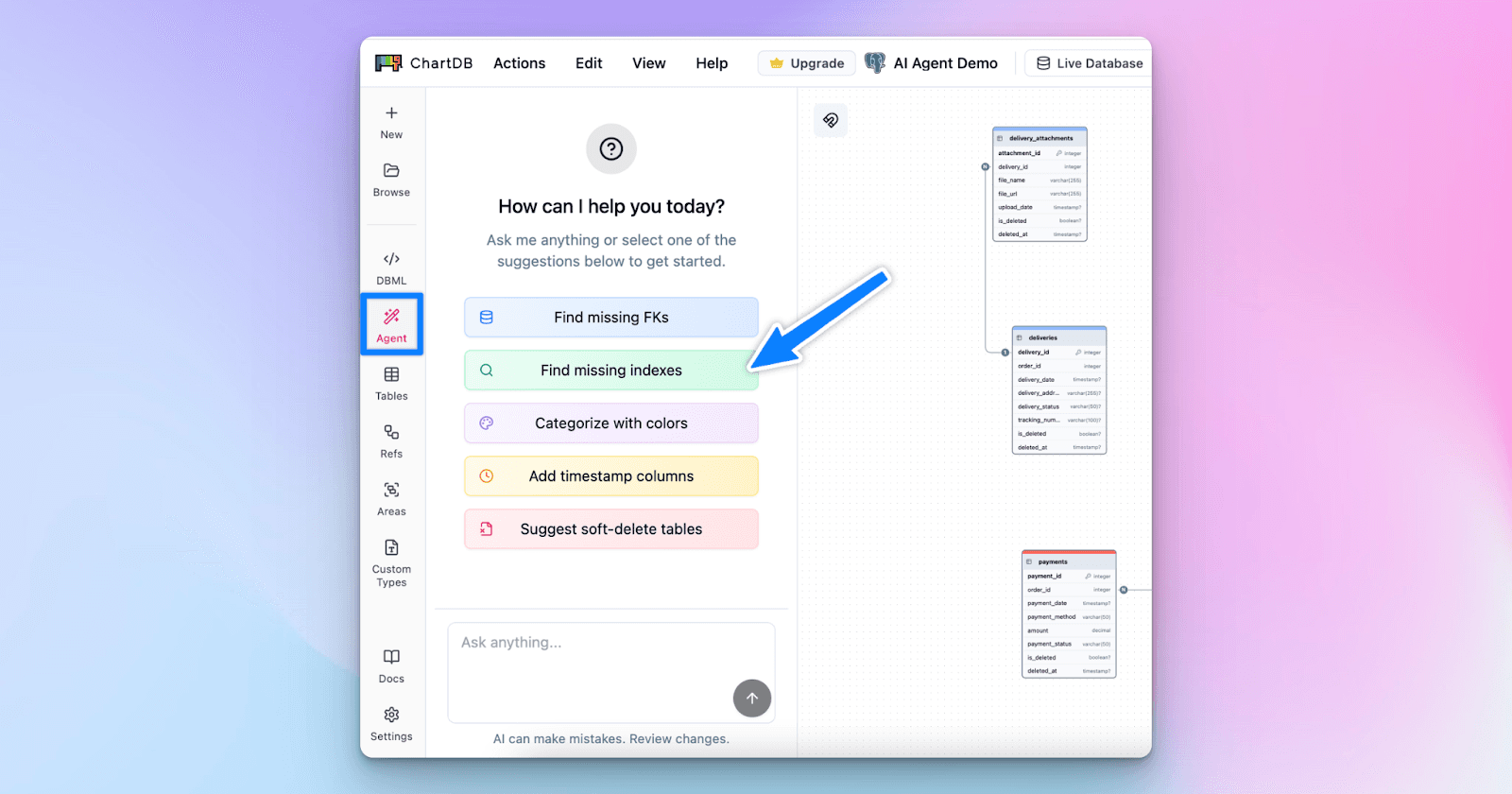
Review the recommendations (with confidence scores and reasons)
Apply them instantly on your schema diagram
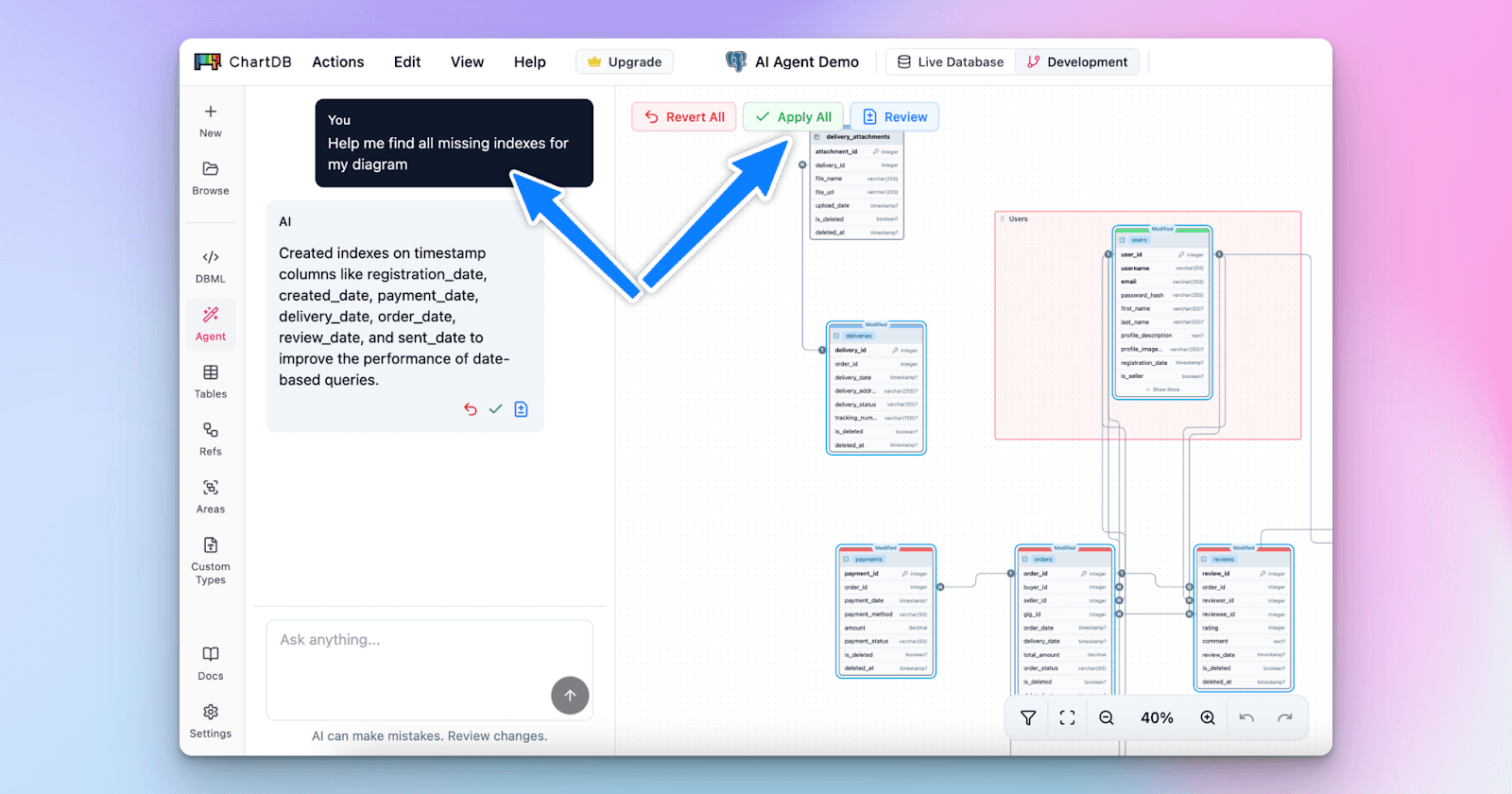
Export the updated SQL or sync changes to your codebase
Recently I created a video walkthrough on how you can use the AI Agent of ChartDB to generate ERDs, find foreign keys and everything else a database would need to better visualize.
When Not to Add an Index
While indexes are powerful, they’re not always the answer. Here are times to hold off:
Small tables: Indexing may not offer real gains
High-write tables: Indexes slow down inserts and updates
Too many indexes: Can confuse the query planner and waste resources
Over-indexed columns: Especially with low-cardinality data (e.g., boolean fields)
Always measure before and after applying changes.
Conclusion
Indexes are one of the most powerful tools for database performance. They accelerate queries, reduce cost, and help your systems scale.
But missing indexes are common, and painful. With ChartDB’s AI Agent, you can identify and fix them in seconds, without diving into engine-specific syntax.
And if you're working across multiple databases, our SQL Dialect Converter ensures your CREATE INDEX statements work whether you're on PostgreSQL, MySQL, or SQL Server.
Try ChartDB for free today and see your performance problems disappear.
Additional Resources
We've all felt it. That frustrating moment when a dashboard takes forever to load, or a simple query drags your app down. It’s usually not the data volume that’s the problem, it’s how your database is structured.
I’ve spent years building and scaling data-driven systems. As the founder of ChartDB, I’ve seen firsthand how often poor performance comes down to one thing: missing indexes. These invisible performance killers are easy to overlook but hard to live without.
In this post, I have outlined methods for identifying missing database indexes, using both traditional techniques and AI with Chartb. This way, you can quickly detect and confidently resolve any missing indexes.
Real-world benefits:
Accelerates search and filtering across large tables
Reduces resource usage (CPU, memory, IO)
Enables fast user experiences for real-time dashboards and applications
Lowers cloud database costs by running more efficient queries
Good indexing means your database works smarter, not harder.
Why You Should Fix Missing Indexes
A missing index means your database is doing full-table scans when it doesn’t have to. It’s an optimization the engine wants but doesn’t have.
You’ll feel it when:
Queries get slower as data grows
Dashboards hang or time out
Analytics reports delay decision-making
Missing indexes break scalability and frustrate users. And spotting them manually? Not fun.
How to Find Missing Indexes
There are 2 methods for finding missing database indexes. Let's check out the traditional method first.
Missing indexes are actually one of the most common database design mistakes that developers overlook, especially when building fast.
Traditional Manual Approach:
You can use database engine views (DMVs) or EXPLAIN plans to identify missing indexes:
PostgreSQL:
EXPLAIN ANALYZE SELECT * FROM orders WHERE customer_id = 123;
SQL Server:
SELECT * FROM sys.dm_db_missing_index_details;
MySQL:
EXPLAIN SELECT * FROM orders WHERE customer_id = 123;
These tools work, but they’re noisy, require interpretation, and are different across engines.
The syntax differences get even trickier when you're working across PostgreSQL, MySQL, and SQL Server simultaneously. If you need to compare schemas or migrate between databases, our SQL Compare tool can help you spot discrepancies before they become problems.
Using ChartDB AI Agent:
ChartDB is a tool for visualizing database schemas and data modeling. It is intended for developers who want to quickly and easily understand their database visually.
With this, you can easily identify missing database indexes using ChartDB’s AI agent. Simply follow these steps.
Log in to ChartDB.io
Import your schema via SQL or direct connection
Open the AI Agent from the toolbar
Click “Detect Missing Indexes”
Review the recommendations (with confidence scores and reasons)
Apply them instantly on your schema diagram
Export the updated SQL or sync changes to your codebase
Recently I created a video walkthrough on how you can use the AI Agent of ChartDB to generate ERDs, find foreign keys and everything else a database would need to better visualize.
When Not to Add an Index
While indexes are powerful, they’re not always the answer. Here are times to hold off:
Small tables: Indexing may not offer real gains
High-write tables: Indexes slow down inserts and updates
Too many indexes: Can confuse the query planner and waste resources
Over-indexed columns: Especially with low-cardinality data (e.g., boolean fields)
Always measure before and after applying changes.
Conclusion
Indexes are one of the most powerful tools for database performance. They accelerate queries, reduce cost, and help your systems scale.
But missing indexes are common, and painful. With ChartDB’s AI Agent, you can identify and fix them in seconds, without diving into engine-specific syntax.
And if you're working across multiple databases, our SQL Dialect Converter ensures your CREATE INDEX statements work whether you're on PostgreSQL, MySQL, or SQL Server.
Try ChartDB for free today and see your performance problems disappear.
Additional Resources
We've all felt it. That frustrating moment when a dashboard takes forever to load, or a simple query drags your app down. It’s usually not the data volume that’s the problem, it’s how your database is structured.
I’ve spent years building and scaling data-driven systems. As the founder of ChartDB, I’ve seen firsthand how often poor performance comes down to one thing: missing indexes. These invisible performance killers are easy to overlook but hard to live without.
In this post, I have outlined methods for identifying missing database indexes, using both traditional techniques and AI with Chartb. This way, you can quickly detect and confidently resolve any missing indexes.
Real-world benefits:
Accelerates search and filtering across large tables
Reduces resource usage (CPU, memory, IO)
Enables fast user experiences for real-time dashboards and applications
Lowers cloud database costs by running more efficient queries
Good indexing means your database works smarter, not harder.
Why You Should Fix Missing Indexes
A missing index means your database is doing full-table scans when it doesn’t have to. It’s an optimization the engine wants but doesn’t have.
You’ll feel it when:
Queries get slower as data grows
Dashboards hang or time out
Analytics reports delay decision-making
Missing indexes break scalability and frustrate users. And spotting them manually? Not fun.
How to Find Missing Indexes
There are 2 methods for finding missing database indexes. Let's check out the traditional method first.
Missing indexes are actually one of the most common database design mistakes that developers overlook, especially when building fast.
Traditional Manual Approach:
You can use database engine views (DMVs) or EXPLAIN plans to identify missing indexes:
PostgreSQL:
EXPLAIN ANALYZE SELECT * FROM orders WHERE customer_id = 123;
SQL Server:
SELECT * FROM sys.dm_db_missing_index_details;
MySQL:
EXPLAIN SELECT * FROM orders WHERE customer_id = 123;
These tools work, but they’re noisy, require interpretation, and are different across engines.
The syntax differences get even trickier when you're working across PostgreSQL, MySQL, and SQL Server simultaneously. If you need to compare schemas or migrate between databases, our SQL Compare tool can help you spot discrepancies before they become problems.
Using ChartDB AI Agent:
ChartDB is a tool for visualizing database schemas and data modeling. It is intended for developers who want to quickly and easily understand their database visually.
With this, you can easily identify missing database indexes using ChartDB’s AI agent. Simply follow these steps.
Log in to ChartDB.io
Import your schema via SQL or direct connection
Open the AI Agent from the toolbar
Click “Detect Missing Indexes”
Review the recommendations (with confidence scores and reasons)
Apply them instantly on your schema diagram
Export the updated SQL or sync changes to your codebase
Recently I created a video walkthrough on how you can use the AI Agent of ChartDB to generate ERDs, find foreign keys and everything else a database would need to better visualize.
When Not to Add an Index
While indexes are powerful, they’re not always the answer. Here are times to hold off:
Small tables: Indexing may not offer real gains
High-write tables: Indexes slow down inserts and updates
Too many indexes: Can confuse the query planner and waste resources
Over-indexed columns: Especially with low-cardinality data (e.g., boolean fields)
Always measure before and after applying changes.
Conclusion
Indexes are one of the most powerful tools for database performance. They accelerate queries, reduce cost, and help your systems scale.
But missing indexes are common, and painful. With ChartDB’s AI Agent, you can identify and fix them in seconds, without diving into engine-specific syntax.
And if you're working across multiple databases, our SQL Dialect Converter ensures your CREATE INDEX statements work whether you're on PostgreSQL, MySQL, or SQL Server.
Try ChartDB for free today and see your performance problems disappear.
Additional Resources

Continue Reading

© 2026 ChartDB
Product
Free Tools
© 2025 ChartDB
Product
Free Tools
© 2025 ChartDB